







Tech support scams: How to spot and avoid them
Tech support scams rely on social engineering and fear tactics to get victims to hand over money or information. Learn about the different types of tech support scams, how they work, and what you can do to protect against them. Then, get Norton 360 Deluxe to help catch scams before they compromise your finances or privacy.






Tech support scams, where cybercriminals impersonate legitimate companies’ support teams, can target people of all ages.
Given the prevalence of these scams, it’s important to know how to defend yourself. Read on to learn how to spot a tech support scam and help protect against falling for one.
What is a tech support scam?
Tech support scams involve fraudsters posing as technical support teams to trick you into believing they can help you with computer or internet issues. They prey on your fear of losing data or breaking your device to get you to pay for fake services, install malware-laden software, or grant them remote access.
The latter threat is particularly dangerous, as a scammer with remote access to your device might claim to detect signs of malware, black out your screen (blaming it on fake malware), and use it as an opportunity to snoop through your files.
How to spot a tech support scam?
Tech support scams will try to create a sense of urgency and ask you to pay for a service or software, send them sensitive information, or give them remote access to your device. Contact is often unsolicited, and scammers might claim to be from a legitimate company, using spoofed or fake numbers to appear more convincing.
Here are some key warning signs that can help you spot tech support scams:
- They pressure you to act quickly: The scammers create a sense of urgency, often by claiming that your phone or computer is infected with a virus. They will then pressure you to take immediate action, such as downloading software or giving them remote access to your device.
- They ask for payment: The scammers will often ask for payment using gift cards or bank transfers. These payment methods are difficult to trace, making it particularly challenging to recover lost funds once sent.
- They contact you out of the blue: The scammers will usually contact you, completely unsolicited, by phone, email, pop-up notification, text message, or on social media. They may claim to be from a well-known company, such as Microsoft or Apple.
- They put phone numbers directly in pop-up adverts: Legitimate companies rarely advertise their phone numbers in pop-ups. If you see a number, avoid calling it directly. Instead, verify the company’s contact information on its official website.
- They make grammar mistakes: Some scammers purposefully make mistakes to weed out sceptical targets early on. Others may just have poor grammar. Either way, legitimate companies will check any messages thoroughly for errors.
Knowing how to spot tech support scams can help you avoid them. If you suspect a scam, cut off contact immediately, run an antivirus scan, and block any suspicious phone numbers.
4 types of tech support scams
Tech support scams fall into four categories: emails, phone calls, pop-ups, and text messages.
1. Fake emails
Scammers use phishing emails to trick you into calling them or clicking a malicious link. Cybercriminals often make vague threats, like “you visited a malicious website,” since they usually don't know anything about your device or online activity at this point.
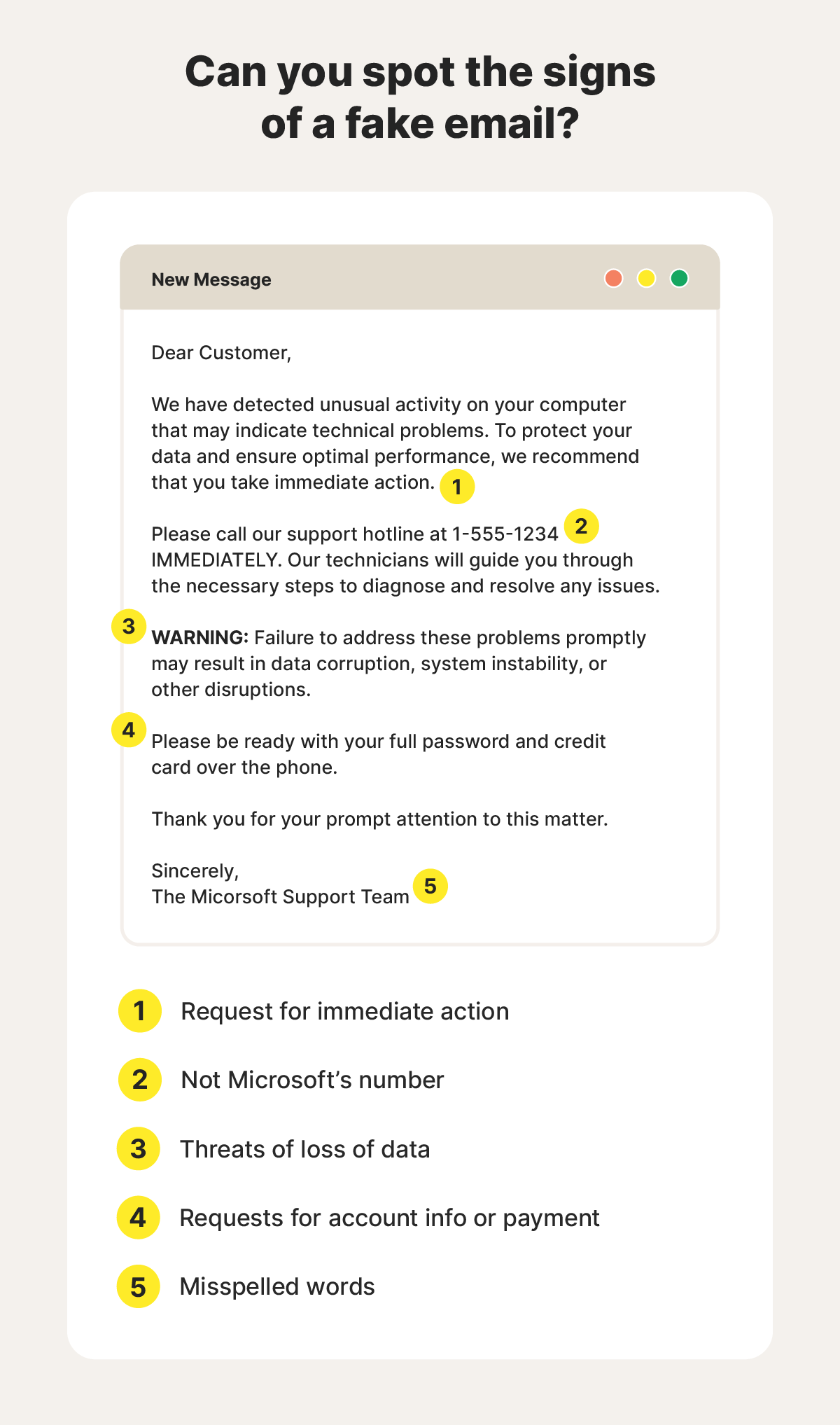
They may pose as representatives from well-known broadband companies such as Sky or Virgin Media to appear more believable. You should be wary of all unsolicited emails, even if they seem to come from a legitimate source. Take a closer look at the email address to ensure it’s authentic, getting in touch with the company directly if you’re suspicious.
Here’s a story from a Reddit user in the US sharing one example of a tech support renewal scam delivered by email:
2. Unsolicited scam calls
Tech support scams often rely on phone calls to create a sense of urgency and panic. They make it easier for scammers to use high-pressure tactics and confuse potential victims, making it more likely that they’ll share sensitive information before they realise they're being scammed.
Fraudsters may call from private or untraceable numbers, making it harder to identify who they really are. They can also use caller ID spoofing, which masks their actual phone number behind false contact information. This can make the caller ID look more convincing, especially if they use a trustworthy company’s name.
3. Scareware pop-ups
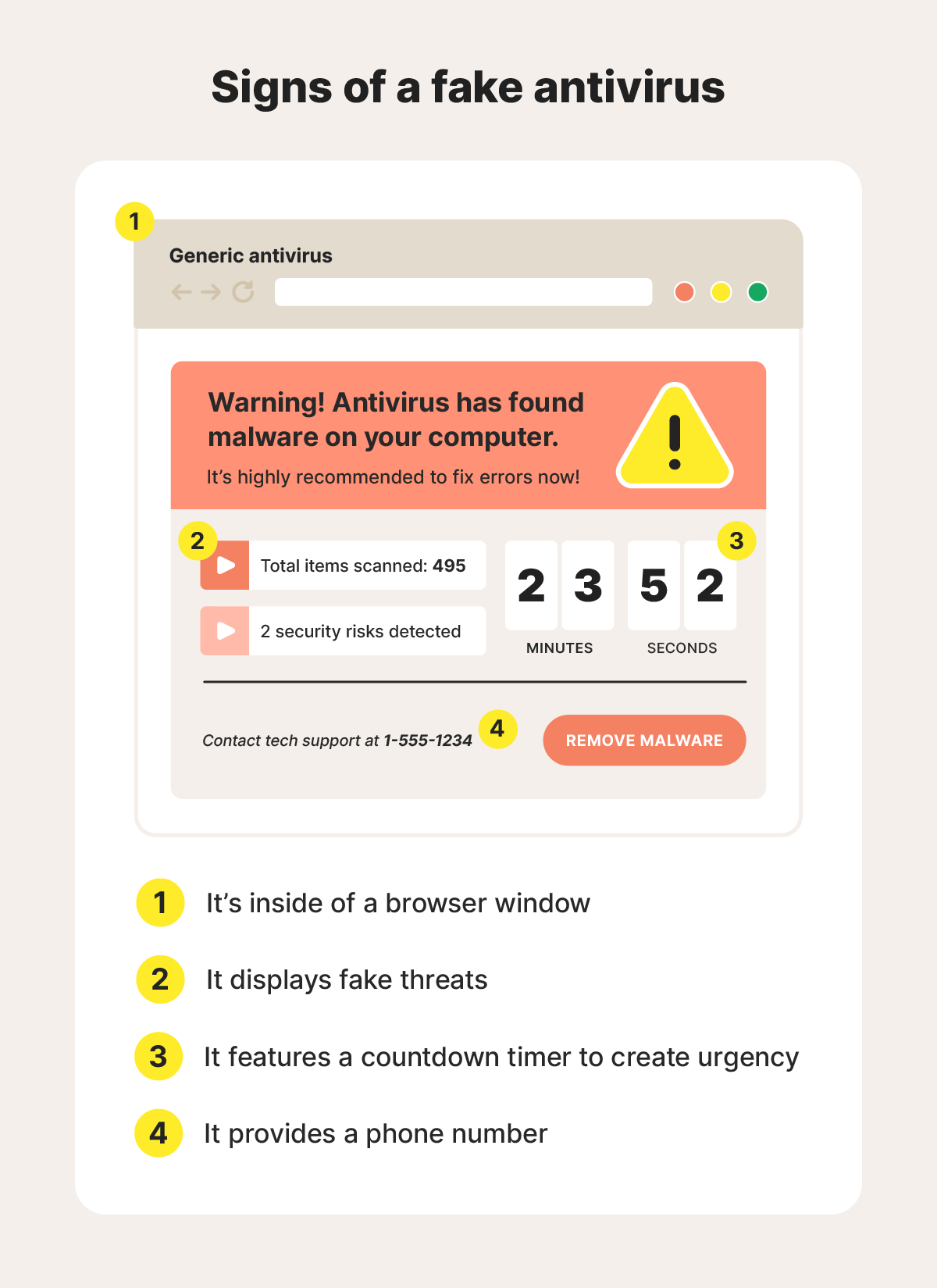
Scareware pop-ups often appear as advertisements or fake error screens. Advertisements can come from adware that floods your device with adverts. Fake error screens are disguised to look like your operating system interface but are actually browser-based pop-ups.
What the experts say
"Deceptive browser alerts let attackers target users long after the initial visit, often with scam content or fake system warnings." - Gen 2025 Threat Report
Ondřej Mokoš, Sr. Principal Threat Analysis Engineer
In most cases, a fake antivirus scam is built to resemble your antivirus or that of a credible brand, whether you use it or not.
4. Fake text messages
Scammers may send fake texts to fool you into thinking there's a problem with your device. These criminals want you to pay them, tap a malicious link, or hand over your personal data.
When a cybercriminal texts you to steal information or money, it’s known as smishing (a combination of SMS and phishing). Like email phishing attempts, a fraudster can spoof a text to make it appear like it’s coming from a trustworthy number, so always think before engaging with a text message and follow the tips below.
How to protect yourself from tech support scams
You can help protect yourself against tech support scams by ignoring unsolicited calls, emails, random number texts, and adverts that look like an antivirus. If you see a fake ad, run an antivirus scan immediately. Also, never provide remote access to your device unless you’re certain it’s safe to do so.
Here are some details on how to protect yourself from tech support scams:
- Don’t respond: Ignore any unsolicited texts, calls, or messages telling you your computer has an error. It’s more than likely a scam or spam message. If you have reason to suspect it’s legitimate, contact the company through an official channel first to confirm that it’s an authentic message.
- Verify company information: If someone claims to be from a company, check their contact information matches what appears on the official website. Don’t rely on social media pages, as scammers can create fake social profiles to support their scams.
- Review error messages: Legitimate error messages rarely contain a phone number or request for more information. Look out for pressure tactics and mistakes in any error messages, too.
- Don’t provide remote access: Remote access lets cybercriminals access your files, review your email contacts, and steal personal information. If a stranger requests remote access to your device, don’t respond and block them immediately.
- Avoid spammy sites: Spammy or dangerous websites, which can also be low-quality versions of other sites, are known for annoying pop-ups and hidden malware. They may use malvertising tactics to infect your device simply by loading a page with a malicious ad.
- Don’t pay for tech support: Unless you bring your computer to a local shop, use a trustworthy service like Norton Ultimate Help Desk, or use an online service provided by a company you already know is authentic, don’t pay for tech support or respond if you receive random offers to help you fix a tech problem.
What to do if you’re the target of a tech support scam
If you think someone is trying to scam you with fake tech support online, exit your browser and run an antivirus scan. If you answer a suspicious call, hang up immediately and block the number.
Here's what to do if you think someone’s trying to scam you:
- Stop contact immediately: If you think you’re on the phone or chatting with a suspected scammer, stop communicating with them.
- Take a screenshot (if safe): If you can, take a screenshot of any messages, pop-ups, or conversations with a scammer. This can be helpful when reporting a scam. Don’t take a screenshot if you’re on an unsafe site, as it could expose your device to malware.
- Run a virus scan: Your device could have a virus even if you didn’t download anything. Visiting a malicious site can infect your device through drive-by downloads, so run your antivirus to find hidden malware.
- Update your software: Update your computer's operating system and software. This can help fix vulnerabilities that cybercriminals use to get into your devices.
- Report the scam to ReportFraud: Report any scams to ReportFraud, the UK’s national fraud and cybercrime reporting centre.
What to do if you fall for a tech support scam
If you fall for a tech support scam, change your passwords, run an anti-malware scan, and notify your financial institutions right away. You should also report the incident to ReportFraud.
Here's what to do if you fall for a scam:
- Remove remote access: If the scammer gained remote access to one of your devices, disconnect it from the internet and work to remove whatever software is granting them access. If you can’t find the compromised programme, consider factory resetting your device to be safe.
- Change passwords on affected accounts: Change any passwords on accounts that could be compromised by the scammer. With access to your online accounts, they’ll be able to collect information that could lead to identity theft.
- Notify financial institutions: If you gave the scammer your card details or entered payment information, notify your bank or credit card issuer. They can help you secure your account and avoid unauthorised transactions.
- Run a virus scan: Run a virus scan to check for lingering malware. The scammer could have installed malware to further compromise your system or spread infections across your home network.
- Monitor your accounts: Monitor your online accounts and financial statements closely for unusual activity. If possible, set up push notifications with your bank to receive real-time alerts for transactions.
- Freeze your credit: Place a credit freeze with each of the major credit reference agencies to help stop cybercriminals from opening loans, applying for credit cards, or getting other financial products in your name.
- Report the fraud: Report the fraud to Report Fraud so they can track similar scams. This also creates a paper trail which could help prove you were scammed in the future.
Get help spotting scams before you’re a victim
Prevention is always better than a cure. Help protect against tech support scams with Norton 360 Deluxe, which includes enhanced AI scam detection that can help you spot fraudulent texts, phone calls, emails, and websites. By analysing the meaning of words, as well as links, it helps detect scam patterns that you otherwise might miss.
FAQs
How do I stop tech support scam popups?
You can stop tech support scam pop-ups by avoiding unsafe websites, enabling your pop-up blocker, and installing a good antivirus on all your devices.
Who do tech support scams target?
Tech support scams are often random, so they can target anyone from young adults to older adults.
How do I spot Microsoft support scams?
You can spot Microsoft support scams by looking for unsolicited calls, texts, or pop-ups, and payment requests to get tech support. Microsoft will never contact you unexpectedly about support, and it does not sell tech support services.
How do I report a tech support scam?
You should report tech support scams to Report Fraud, the UK’s national fraud and cybercrime reporting centre. They offer an easy online form to submit on their website.
Editorial note: Our articles provide educational information for you. Our offerings may not cover or protect against every type of crime, fraud, or threat we write about. Our goal is to increase awareness about Cyber Safety. Please review complete Terms during enrollment or setup. Remember that no one can prevent all identity theft or cybercrime, and that LifeLock does not monitor all transactions at all businesses. The Norton and LifeLock brands are part of Gen Digital Inc.







Want more?
Follow us for all the latest news, tips, and updates.