







What is a VPN tunnel and how does it work?
A VPN tunnel provides an encrypted channel for your internet data, helping to prevent hacking and eavesdropping. Keep reading to learn more about VPN tunnels and how they work. Then, get Norton VPN to access ultra-secure, flexible tunneling protocols to suit your needs.

2025
Consumer
Security Innovator





A VPN (virtual private network) tunnel is a secure, encrypted connection between your device and a remote server that helps protect the data you send and receive from interception.
“Full tunnels” encrypt all your internet traffic, whereas “split tunnels” let you choose to encrypt some data streams while keeping others open, which can be helpful while streaming. The level of protection provided by any VPN tunnel depends on the encryption protocols used and the security measures of the VPN service itself.
How does VPN tunneling work?
VPN tunneling works by using tunneling protocols to create a secure, encrypted connection between a device and a remote server. Internet traffic is then routed through this tunnel to protect data against packet sniffing or other forms of interception, helping to hide internet activity from hackers, snoops, and other third parties.
Once you turn on your VPN, it may prompt you to select a protocol if there are multiple options. Then, the VPN will establish an encrypted connection between your device and the server, hiding your IP address and allowing you to send and receive data privately and securely.
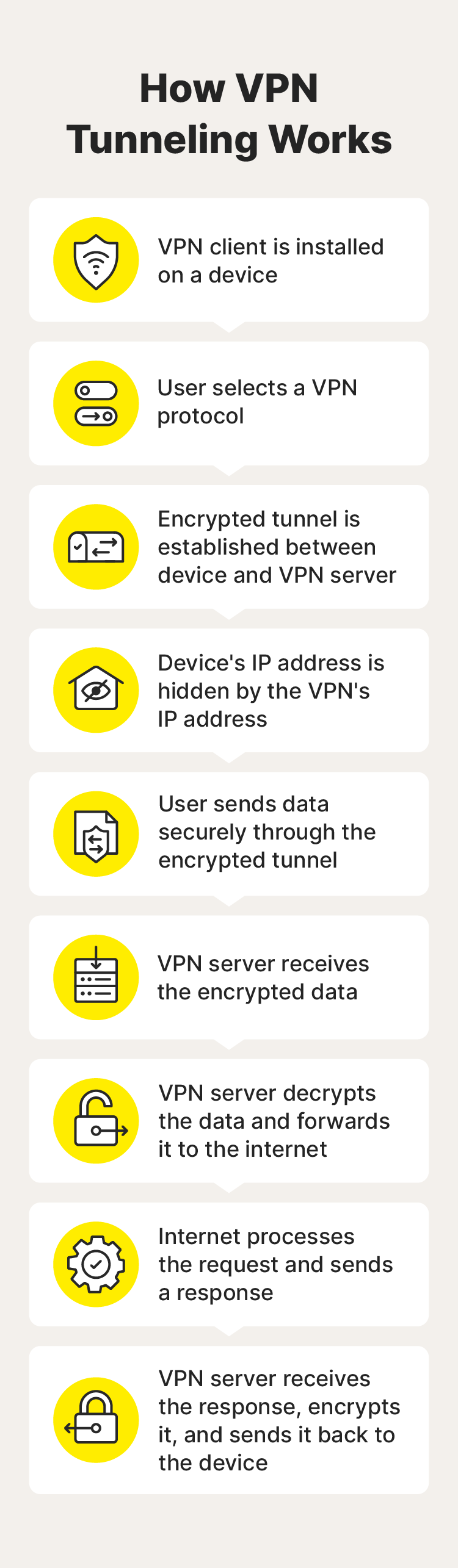
Here’s a closer look at how the tunneling process works:
- Choose a VPN service: Subscribe to a VPN service like Norton VPN and install the app on your device.
- Select a VPN protocol: Many VPNs come with a default protocol you can’t change, but if prompted, choose one based on your security and speed requirements.
- Establish an encrypted channel: Turn on your VPN to create a secure, encrypted connection to a VPN server.
- Your IP address is hidden: Your real IP address is obscured behind the virtual IP assigned via the VPN server, making your session more anonymous.
- Transmit encrypted data: Now, you can privately browse, shop, stream, game, message, and more—all your internet traffic will be encrypted and sent through the secure VPN tunnel.
- The server receives data: The VPN server receives your encrypted data and decrypts it.
- The server sends data: The VPN server forwards the unencrypted data to the intended destination such as a website or file-sharing service.
- Return data is encrypted and sent to your device: Incoming data gets encrypted by the VPN server and sent back through the secure tunnel to your device.
Types of VPN tunneling protocols
The different types of VPN protocols include the Point-to-Point Tunneling Protocol (PPTP), the Layer 2 Tunneling Protocol (L2TP), the Secure Socket Tunneling Protocol (SSTP), OpenVPN, and WireGuard. VPNs use these to create secure tunnels that protect data during transmission.
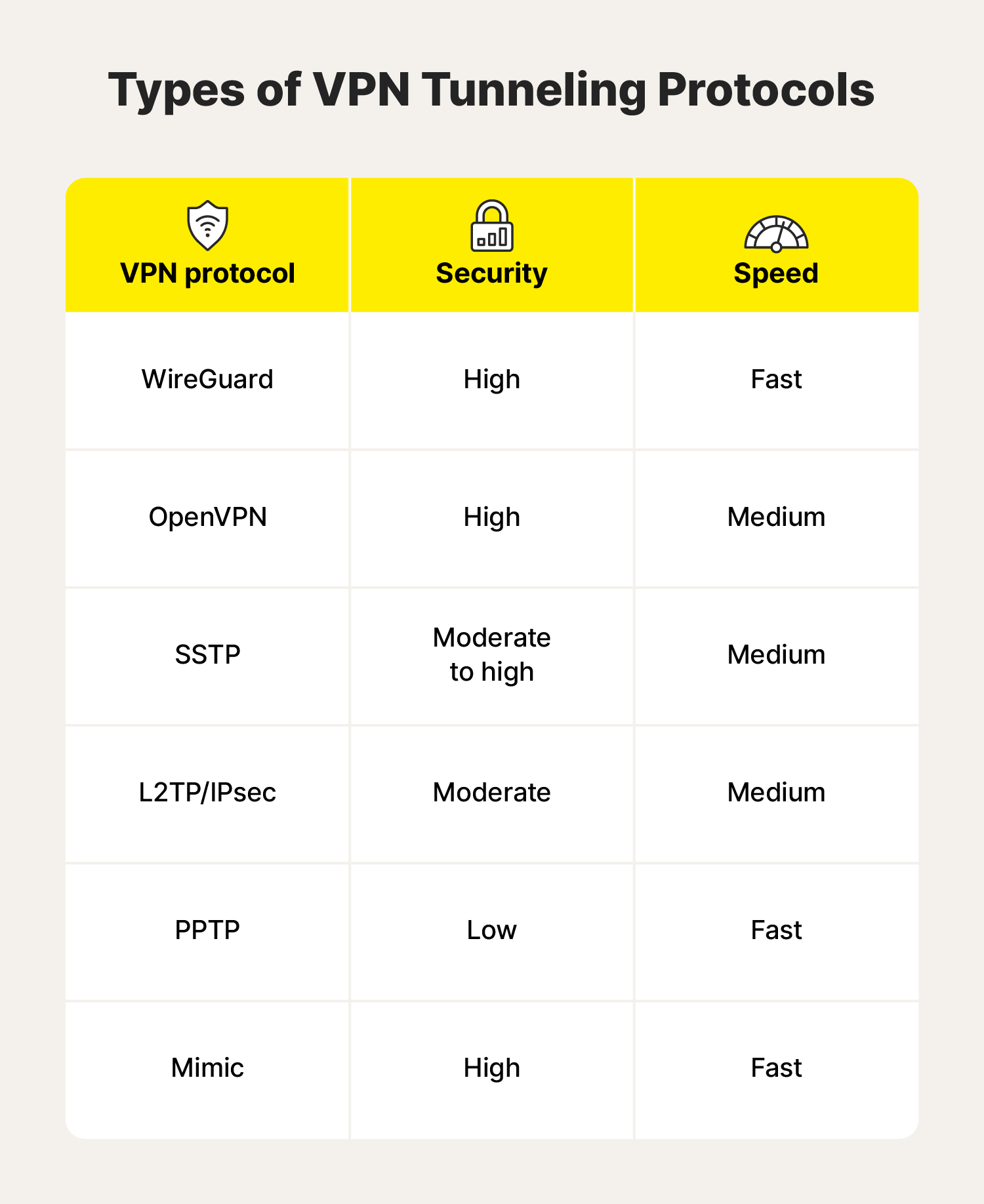
Each VPN tunneling protocol has strengths and drawbacks—some are fast, some are ultra-secure, and others are compatible with specific platforms and devices. Here’s a deeper dive into what each of them has to offer.
WireGuard
WireGuard is a free, lightweight, open-source VPN protocol. Unlike older protocols, WireGuard is known for its fast connection speeds, efficient resource usage, and straightforward configuration. It uses advanced cryptographic techniques to create a secure, encrypted data tunnel.
Already a popular VPN tunnel protocol, it continues to gain favour among mobile users. And, as it’s still in active development, its performance will likely only improve as it receives new updates.
- Security: High
- Speed: Fast
- Type: Full tunnel or split tunnel
OpenVPN
OpenVPN is a widely used, open-source VPN protocol known for its strong security and flexibility. It’s currently considered one of the top VPN tunneling protocols because of its encryption strength, customisability, and ability to get past firewalls.
This protocol works with major operating systems like Linux, Windows, and Mac, and mobile operating systems such as Android and iOS. If you prefer independent operating systems, OpenVPN also works with systems such as FreeBSD, NetBSD, Solaris, and OpenBSD.
- Security: High
- Speed: Medium
- Type: Full tunnel or split tunnel
Secure Socket Tunneling Protocol (SSTP)
SSTP (Secure Socket Tunneling Protocol) is a highly secure VPN protocol developed by Microsoft. It encapsulates data within an SSL/TLS encrypted tunnel and doesn’t use fixed ports, allowing it to provide strong protection and bypass firewalls, potentially including even the Great Firewall of China, which censors certain types of online content and blocks many VPN protocols.
The main drawback of the SSTP is limited compatibility—while it’s natively supported on Windows machines you need a third-party app that supports SSTP to use it on other devices.
- Security: High
- Speed: Medium
- Type: Full tunnel
Layer 2 Tunneling Protocol (L2TP/IPsec)
L2TP/IPsec combines two protocols— the Layer 2 Tunneling Protocol and Internet Protocol Security—to establish a secure VPN connection. L2TP creates a tunnel for data transmission, while IPsec handles the encryption and authentication of that data. Together, they provide reliable VPN connections for various devices and operating systems.
While it’s still a widely supported protocol, there are several faster and more compatible options available.
- Security: Moderate
- Speed: Medium
- Type: Full tunnel
Point-to-Point Tunneling Protocol (PPTP)
PPTP (Point-to-Point Tunneling Protocol) is one of the oldest VPN protocols and isn’t used much anymore. In its heyday, it was known for its extremely fast connection speeds and easy setup. But that speed comes at a cost, because its level of data encryption is weak compared to today's standards. That means it's easier for hackers to access user data in transit.
- Security: Low
- Speed: Fast
- Type: Full tunnel
What is VPN split tunneling?
VPN split tunneling is a feature that allows you to choose which apps and processes should and shouldn’t have their internet traffic routed through the VPN. Anything not selected would bypass the VPN and travel outside the protection of the encrypted tunnel. This is helpful when you want to secure some of your traffic while ensuring that other app or connection traffic flows openly.
Send your data through a VPN if you’re: |
Skip the encryption if you’re: |
|---|---|
Shopping or banking online |
Communicating between devices on your home network |
Accessing work files |
Checking a weather app |
Opening files containing personal information |
On a secure network and need to reduce latency |
Logging into online accounts |
Browsing nonsensitive websites |
Bypassing content restrictions |
Make your VPN work for you
The security, speed, and compatibility of a VPN ultimately come down to the strengths of its underlying protocols.
Norton VPN offers powerful encryption with fast connection speeds and a choice of several industry-leading tunneling protocols like WireGuard and OpenVPN, as well as Mimic, our proprietary VPN protocol that masquerades as a standard HTTPS connection for ultimate privacy, security, and accessibility.
FAQs about VPN tunnels
Still have questions about VPN tunnels? Here’s what you need to know.
What is the difference between a VPN, a VPN server, and a VPN tunnel?
A VPN is a service that protects your privacy by masking your IP address and online activity. It creates a secure, encrypted VPN tunnel between your device and a remote VPN server, safeguarding your online data from interception. The VPN server acts as an intermediary between your device and the wider internet, hiding your real location and identity.
Can VPN tunnels get hacked?
Yes, like any software, VPN tunnels can be hacked, especially if you’re using a low-quality cracked VPN. A VPN's hackability depends on factors like the protocol, its encryption strength, and the VPN provider's overall security practices. High-quality VPNs like Norton VPN use extremely powerful, bank-grade AES-256 encryption.
How do you set up a VPN tunnel?
Setting up a VPN tunnel typically involves choosing a VPN service, installing the necessary client software on your device, and selecting a VPN protocol and server location. Once connected, your internet traffic is encrypted and routed through the VPN server.
Editorial note: Our articles provide educational information for you. Our offerings may not cover or protect against every type of crime, fraud, or threat we write about. Our goal is to increase awareness about Cyber Safety. Please review complete Terms during enrollment or setup. Remember that no one can prevent all identity theft or cybercrime, and that LifeLock does not monitor all transactions at all businesses. The Norton and LifeLock brands are part of Gen Digital Inc.







Want more?
Follow us for all the latest news, tips, and updates.