






Is public Wi-Fi safe? An ultimate guide to its risks
Public Wi-Fi is ubiquitous and obviously very convenient—but is it safe? Keep reading to learn more about public Wi-Fi, its risks, and how a VPN can help you browse more safely while you’re out and about.

2025
Consumer
Security Innovator





Whether you work remotely, travel frequently, or just love staying connected on the go, chances are you've used public Wi-Fi. And according to some sources, almost 60% of internet users worldwide have logged into their personal email accounts on a public Wi-Fi network.
Free public Wi-Fi is available virtually everywhere—airports, restaurants, coffee shops, libraries, public transit, hotel rooms, you name it. But while these networks are convenient, they could leave you vulnerable to online threats and cyberattacks.
Below, we’ve put together a comprehensive guide to help you learn more about public Wi-Fi, its risks, and how you can use it more safely.
What are the risks of using public Wi-Fi?
Public Wi-Fi networks come with significant risks like data interception, malware, and identity theft. Business owners may think they're offering a helpful service, but if there’s a lack of Wi-Fi security, they could be endangering their customers.
Here’s a closer look at the various risks posed by public Wi-Fi:
Unencrypted networks
Many public Wi-Fi hotspots are unencrypted networks that transmit data in plain text, making it vulnerable to cybercriminals with the right tools. Hackers on the same network can intercept your online activities, including banking information, login credentials, and personal messages.
Malicious hotspots
Malicious hotspots, or rogue access points, are deceptive networks that trick users into connecting by mimicking legitimate Wi-Fi names. For instance, if you were staying at the Goodnight Inn and wanted to connect to the hotel’s Wi-Fi, you might mistakenly select “GoodNight Inn” (with a capital N) instead of the correct network. By doing so, you risk connecting to an “evil twin” network set up by cybercriminals to access your internet traffic.
Man-in-the-middle attacks
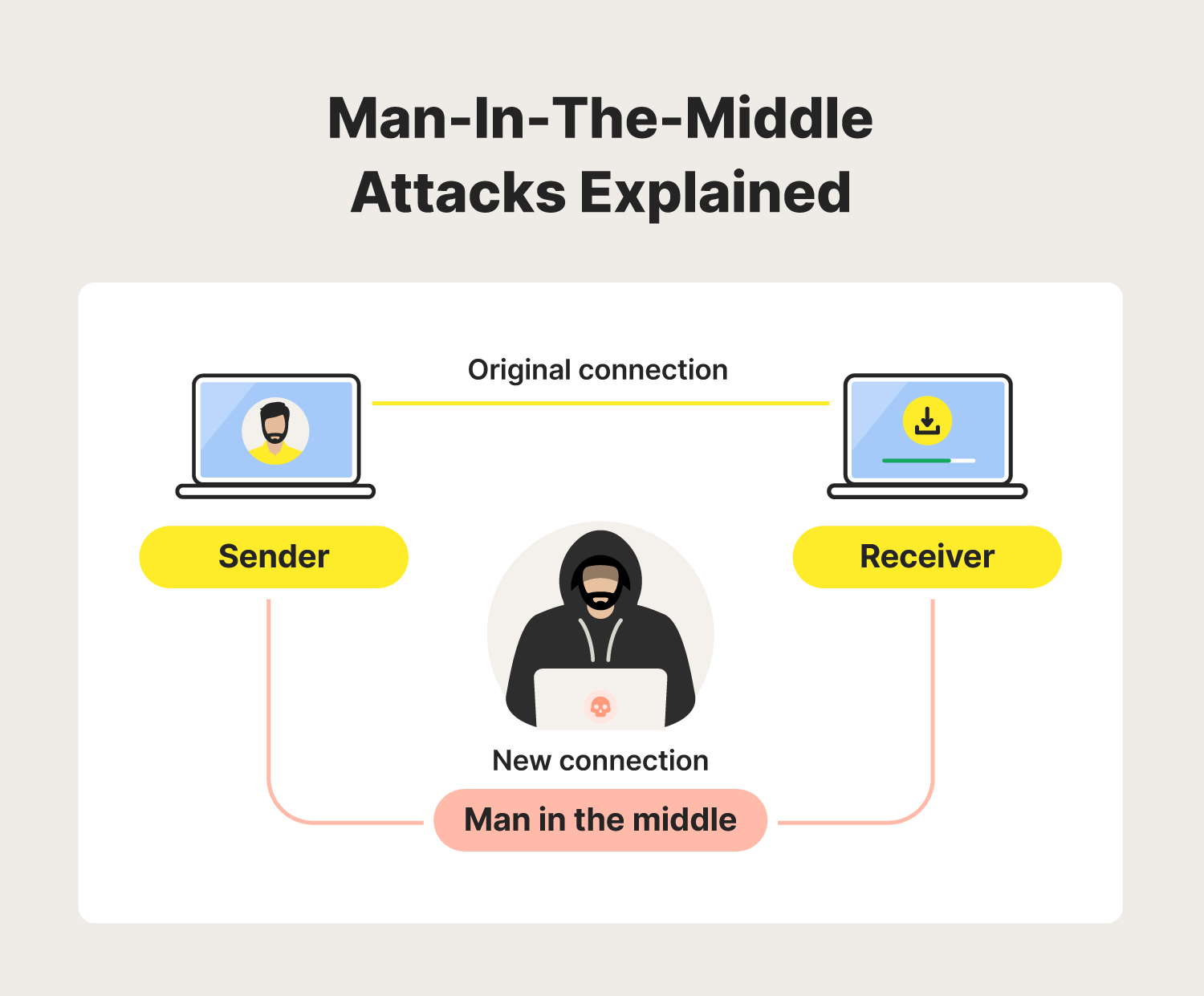
A man-in-the-middle attack is a cyberattack where an intruder secretly positions themselves between two communicating parties, such as a user and an application. This allows them to intercept, eavesdrop on, or manipulate communications.
On unsecured public Wi-Fi networks, attackers can capture data packets more easily, potentially giving them full access to sensitive information like login credentials, credit card numbers, or personal messages. In the case of session hijacking, they may also alter the data, leading to fraudulent activities or data breaches.
Malware distribution
When you connect to public Wi-Fi, it may open you up to malware attacks by bad actors lurking on the network. Once a connection has been established, they can exploit vulnerabilities in your device's software to install malicious programs without your knowledge, including spyware that steals personal information or ransomware that holds your system hostage or turns your device into a DDoS “zombie” bot.
Packet sniffing
Packet sniffing—also known as Wi-Fi snooping—is exactly what it sounds like. Cybercriminals can buy special software kits and devices to help them eavesdrop on Wi-Fi signals. This technique allows the attackers to see your online activity—from viewing whole web pages you’ve visited to capturing sensitive documents and photos you send and receive.
Practical tips for safer browsing on public networks
Now that you know the dangers of using public Wi-Fi, let’s dig into some ways to mitigate the risks. Follow along to learn how you can stay safe when connecting to unsecured networks.
1. Use a VPN
One of the best ways to minimise public Wi-Fi security risks is to use a VPN, which establishes a private, encrypted VPN tunnel through which your data is sent and received. With access to a premium VPN service like Norton VPN, you’ll benefit from ironclad security features to help ensure your connection is safe.
2. Avoid accessing sensitive information
It’s best to avoid accessing or entering sensitive information while connected to public Wi-Fi. However, there’s a lower risk when using these networks to study, look up directions, play games, stream videos, and carry out other non-sensitive online activities.
3. Stick to “HTTPS” websites
It’s good practice to browse only websites that have an SSL certificate—especially while on public Wi-Fi. You can tell if a website has an SSL certificate when the URL begins with “HTTPS,” or you can see a padlock symbol showing it's secure.
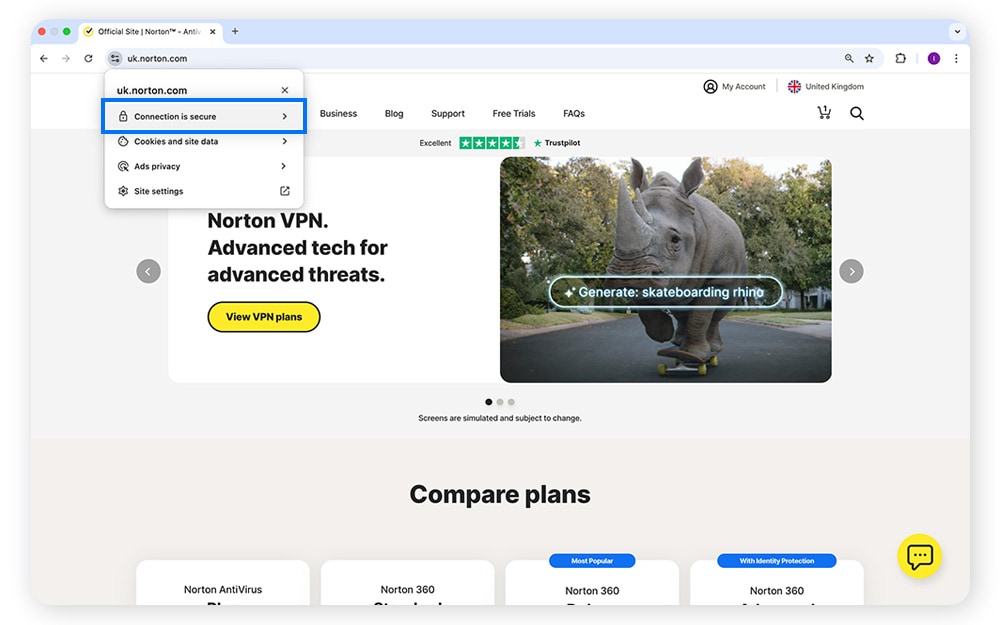
Websites with addresses starting with “HTTPS” are encrypted, adding an extra layer of security to help protect your browsing activity. If you connect to unsecured Wi-Fi networks and use “HTTP” instead of “HTTPS” addresses, your traffic could be visible to anyone else on the network.
4. Use browser extensions
Privacy and security browser extensions can bolster your safety on public Wi-Fi by preventing browser fingerprinting, and blocking cookies and ads. The Norton Safe Web extension even blocks malicious websites to help reduce the risk of malware or phishing attacks.
5. Adjust your connection settings
Configure your devices to avoid automatically connecting to unsecured public hotspots by disabling the “Connect Automatically” feature. This prevents your devices from broadcasting their intent to connect to your home Wi-Fi network, reducing the risk of attackers setting up a fake network with the same name to deceive you.
6. Turn off file sharing
Make sure you turn off file sharing before accessing public Wi-Fi. Keeping file sharing enabled could expose your folders to anyone on the same network, potentially allowing hackers to access your private information without your consent.
7. Set strong passwords
Strong passwords are a vital line of defence against unauthorised access to your accounts via public Wi-Fi. Create complex passwords by mixing uppercase and lowercase letters, numbers, and special characters to make them harder for hackers to crack. And always use unique passwords for each online service to prevent attackers from accessing multiple accounts if one password is compromised.
8. Use two-factor authentication
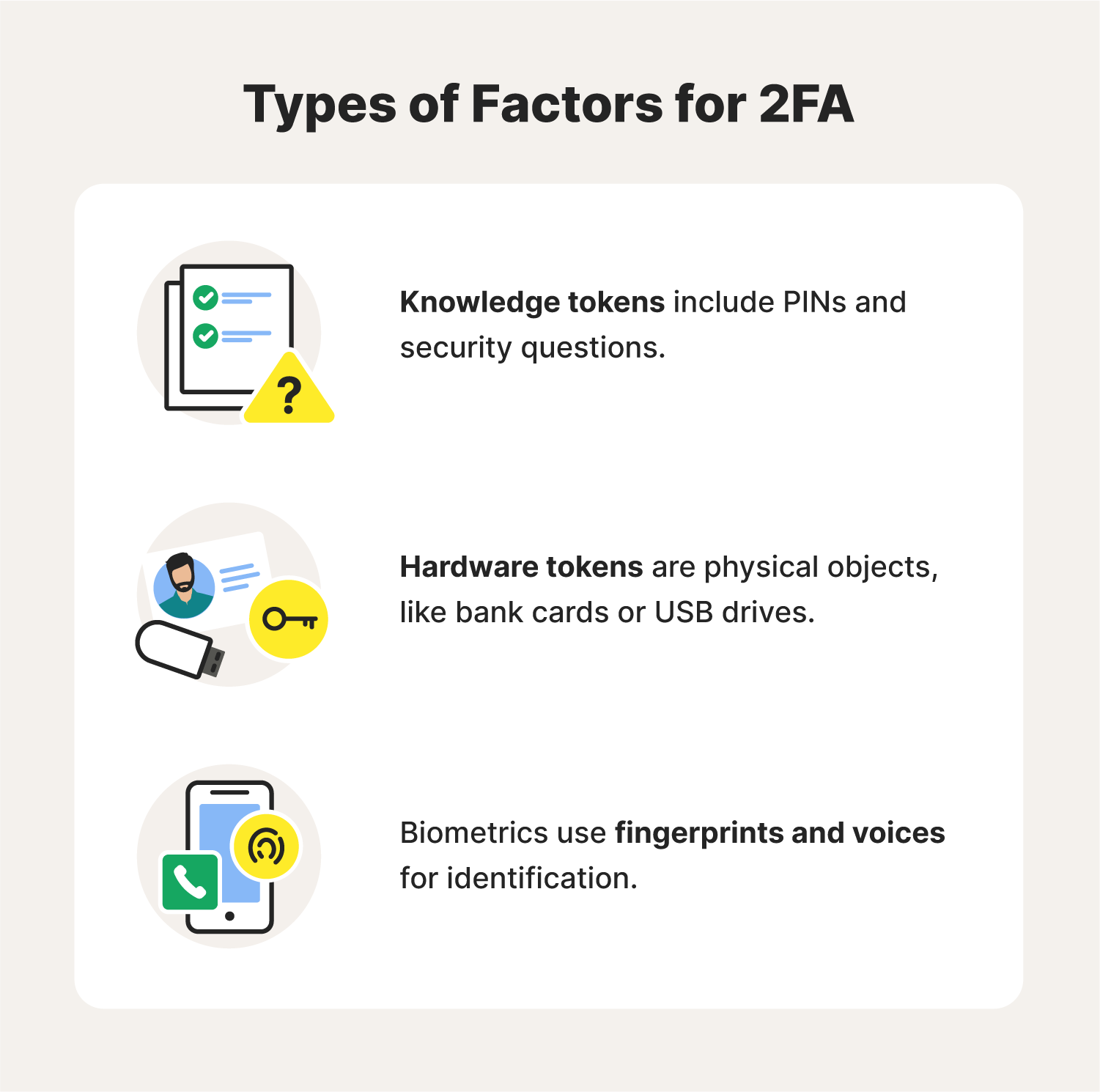
No matter how strong and unique your passwords are, they may still be compromised by snoops intercepting your internet traffic on public Wi-Fi. To bolster your Wi-Fi protection, enable two-factor authentication (2FA) on services that offer it.
This means that even if someone obtains your password, they won’t be able to access your accounts without the second authentication step, such as a code sent to your smartphone.
9. Remember to log out
When using public computers, always log out of your accounts when you're finished. If you're on your own device, choose “forget the network” after your session ends to avoid automatic reconnection. That helps minimise the time your device remains connected to potentially unsecured public Wi-Fi.
10. Keep your systems up to date
Keeping your operating systems, browsers, and security software up to date is crucial for protecting your online activities on public Wi-Fi. Updates often include patches for vulnerabilities that cybercriminals exploit, so promptly installing them bolsters your device’s defences against malware, hacking attempts, and data breaches, reducing the risk of unauthorised access to your personal information.
11. Use antivirus software
Using digital security software is another great way to help stay safe while using public Wi-Fi. With robust protection like Norton 360 Deluxe, you can use public Wi-Fi networks more safely, confident that you’re better protected against hacking attacks, malware, and other online threats.
Signs you may be connected to an unsafe Wi-Fi network
Many hackers prefer to piggyback off of public Wi-Fi networks, but some may go the extra mile and create a fake hotspot that they control. To help you avoid these traps, take a look at some of the common signs of a rogue Wi-Fi network:
- The network name matches a trusted network: In some cases, a hacker may set up a fraudulent Wi-Fi network to impersonate an existing network. An example of this is seeing duplicate network names or being connected to your “home network” even when you’re away from home.
- “HTTPS” sites render as “HTTP”: If you’re trying to connect to a secure website and notice that the page is loading as an “HTTP” site instead, you may be connected to a rogue Wi-Fi hotspot.
- The name is generic: Certain rogue networks may show up in highly populated areas with vague names such as “Free Wi-Fi,” hoping to lure unsuspecting victims. In most cases, legitimate public Wi-Fi networks such as ones at coffee shops will have a more specific name that is displayed in their place of business.
- Unusual activity: If you notice unusual pop-ups, ads, frequent Wi-Fi disconnections, or slow speeds, you could be on a compromised network. Limit your risk by disconnecting immediately and scanning for malware if this happens.
Now that you know the nitty-gritty of public Wi-Fi safety, its risks, and how you can use it safely, you’re well on your way to maximising your internet safety, especially if you use a VPN when going online.
Keep your browsing private
Public Wi-Fi is inarguably convenient, but as we’ve discussed, it can also expose you to significant security risks.
For extra Wi-Fi protection, use Norton VPN to create a secure, encrypted tunnel between your device and the internet, helping to ensure that the data you send and receive remains safe from prying eyes. Enjoy greater peace of mind with Norton VPN.
FAQs about public Wi-Fi
Is public Wi-Fi safe? What are the risks of public Wi-Fi? We’ve got answers.
How to find safe and free public Wi-Fi near me?
You can usually find safe and free Wi-Fi in public places like libraries or community centres. You can use a Wi-Fi finder app to locate nearby hotspots in other places such as parks, coffee shops, and shopping malls—but beware that these networks may be unsecured.
What can others see when I use public Wi-Fi?
On public Wi-Fi, others can potentially see the websites you visit, the information you enter, and your device's MAC (media access control) address using methods like packet sniffing. However, with HTTPS website encryption (the padlock symbol in your browser), your data is usually safe from interception.
Is it safe to use public Wi-Fi for banking?
While it’s usually pretty safe to use password-protected public Wi-Fi for non-sensitive activities, when it comes to sensitive topics such as banking, there’s always a risk an attacker might use tactics like packet sniffing or man-in-the-middle attacks to steal your data. Along with banking, it’s better to avoid the following activities on public Wi-Fi:
- Filling out applications
- Shopping
- Logging into accounts
- Sending or receiving sensitive emails
- Downloading files or apps
Is hotel Wi-Fi safe?
Hotel Wi-Fi hotspots are typically shared by many different people, meaning you don’t know who might be able to access your network data. As with other public Wi-Fi, hotel Wi-Fi isn’t always encrypted, leaving you and your data more vulnerable to threats. Stay safe and minimise Wi-Fi security risks by encrypting your connection with Norton VPN while you browse.
Editorial note: Our articles provide educational information for you. Our offerings may not cover or protect against every type of crime, fraud, or threat we write about. Our goal is to increase awareness about Cyber Safety. Please review complete Terms during enrollment or setup. Remember that no one can prevent all identity theft or cybercrime, and that LifeLock does not monitor all transactions at all businesses. The Norton and LifeLock brands are part of Gen Digital Inc.






Want more?
Follow us for all the latest news, tips, and updates.