Who's this for?

Answer 3 quick questions to get matched with the best protection. Firstly, choose who or what you need to cover below.

What are you most concerned about?

We'll suggest the best coverage for your concerns. Select all that apply.

How many devices do you need to protect?

For the best protection, cover every device you use online.

Creating your recommendation

norton:productquiz:iconturninggears
Did you know?
Norton technology blocks millions of cyberthreats every day.
Trusted by millions of customers around the globe.
Norton™ Mobile Security
Standard
£ 29.99first yr

Automatically renews at
{ar}/year, unless the renewal is cancelled.
Price is subject to change.
Subscription details below.*

  • Protection for 1 iPhone® or iPad®
  • Scam Protection
  • Wi-Fi Security
  • Internet Security
  • Device Security
Norton AntiVirus
Plus
£ 34.99first yr

Automatically renews at
{ar}/year, unless the renewal is cancelled.
Price is subject to change.
Subscription details below.*

  • 1 PC, Mac, tablet, or phone
  • Scam Protection
  • Antivirus, malware, ransomware, and hacking protection
  • 100% Virus Protection Promise2
  • 2 GB Cloud Backup‡‡,4
  • Password Manager
  • Deepfake Protection23,33
Norton 360
Standard
£ 24.99first yr

Automatically renews at
{ar}/year, unless the renewal is cancelled.
Price is subject to change.
Subscription details below.*

  • 1 PCs, Macs, tablets, or phones
  • Scam Protection
  • Antivirus, malware, ransomware, and hacking protection
  • 100% Virus Protection Promise2
  • 10 GB Cloud Backup‡‡,4
  • Password Manager
  • Deepfake Protection23,33
  • VPN private connection
Norton Identity Advisor
Plus
£ 19.99/per yr

Payment method required.
When trial ends, paid subscription starts and automatically renews at {ar}/year, unless the renewal is cancelled. Price is subject to change. Subscription details below.*

  • Financial Monitoring​
  • Credit Report and Score​18
  • Credit Alerts​18
  • Identity Restoration Support
  • Social Media Monitoring17
  • Dark Web Monitoring​§
Norton 360
Deluxe
£ 89.99first yr

Automatically renews at
{ar}/year, unless the renewal is cancelled.
Price is subject to change.
Subscription details below.*

  • 5 PCs, Macs, tablets, or phones
  • Scam Protection
  • Antivirus, malware, ransomware, and hacking protection
  • 100% Virus Protection Promise2
  • 50 GB Cloud Backup‡‡,4
  • Password Manager
  • Deepfake Protection23,33
  • VPN private connection
  • Parental Control
  • Dark Web Monitoring§
Norton VPN
Standard
£ 59.99first yr

Automatically renews at {ar}/year, unless the renewal is cancelled. Price is subject to change.
Subscription details below.*

  • IP masking to hide your online activities
  • Access your favourite content across borders
  • Ad Blocker to browse without annoying ads14
  • No-log policy to ensure your privacy
  • Kill Switch to help prevent privacy exposure
  • IP Rotation and Double VPN for extra privacy
  • AI-powered protection against scams, phishing, and malware. 
  • Monitoring for your info on the dark web§
  • Password Manager to use strong passwords
  • 10 GB of Cloud Backup4 for valuable files
Norton
Small Business Premium
£ 219.99/first yr (Up to 5 employees)

Automatically renews at {ar}/year, unless the renewal is cancelled.
Price is subject to change.
See subscription details below.*

  • 10 PCs, Macs, tablets, or phones
  • Alerts on suspicious transactions on your company's bank accounts.
  • Social Media Monitoring to help you prevent admin account takeover.17
  • Business Tech Support on call 24/7, ready to assist with common tech issues and virus removal.
  • Secure VPN for a safer internet connection wherever work takes you.
  • 500 GB secure Cloud Backup for your business-critical data.21
  • Driver Updater for enhanced security and more reliable PC performance.21
Norton 360
Advanced
£ 149.99first yr

Automatically renews at
{ar}/year, unless the renewal is cancelled.
Price is subject to change.
Subscription details below.*

  • 10 PCs, Macs, tablets, or phones
  • Scam Protection Pro
  • Antivirus, malware, ransomware, and hacking protection
  • 100% Virus Protection Promise2
  • 200 GB Cloud Backup‡‡,4
  • Password Manager
  • Deepfake Protection23,33
  • VPN private connection
  • Parental Control
  • Dark Web Monitoring§
  • Identity Restoration Support
  • Credit Report and Score18
  • Credit Alerts18
  • Stolen Wallet Assist
  • Social Media Monitoring17
  • Financial Monitoring
Norton
Small Business
£ 129.99/first yr

 Automatically renews at {ar}/year, unless the renewal is cancelled.
Price is subject to change.
See subscription details below.*

  • Always-on cyber protection for your business devices.
  • Secure browser to work, browse, and bank safer online.
  • Encrypted vault for your passwords and corporate credit cards.
  • Automatic Software Updater to close security risks and holes.21
  • Windows PC cleaner and optimizer to support your employees' productivity with well-maintained PCs.21
  • Monitoring for exposed employee identities on the dark web (5 contacts).§
  • 250 GB secure Cloud Backup for your business-critical data.21
Norton
Small Business
£ 74.99/year

Automatically renews, unless the renewal is cancelled.
Price is subject to change.
Subscription details below.*

  • 5 PCs, Macs, tablets, or phones
  • Always-on cyber protection for your business devices.
  • Secure browser to work, browse, and bank safer online.
  • Encrypted vault for your passwords and corporate credit cards.
  • Automatic Software Updater to close security risks and holes.21
  • Windows PC cleaner and optimizer to support your employees' productivity with well-maintained PCs.21
  • Monitoring for exposed employee identities on the dark web (5 contacts).§
  • 250 GB secure Cloud Backup for your business-critical data.21

Your personalized matches

norton:productquiz:iconshieldnumber60
60-day money-back guarantee
  • Best choice

  • Better choice

  • Good choice

*Important subscription, pricing, and offer details:

  • By subscribing, you are purchasing a recurring subscription which will automatically renew.
  • The price quoted today is valid for the offered introductory term. After that, your subscription will be billed at the applicable monthly or annual renewal price here. The price is subject to change, but we will always send you a notification email in advance.

2 Requires an automatically renewing subscription for a product containing antivirus features. For further terms and conditions, please see norton.com/virus-protection-promise.
4 Only available on Windows systems (but not in S mode or on ARM processors).
21 Utilities Ultimate, Driver Updater, Software Updater, and Cloud Backup features are only available on Windows (excluding Windows in S mode and Windows running on ARM processor).
Monitoring available on Windows™ PC, iOS, and Android™ devices. Not all features available on all platforms.
§ Monitoring not available in all countries and varies based on region.

norton:productquiz:iconquestionmarkspeechbubble

norton:productquiz:iconquestionmarkspeechbubble

norton:productquiz:iconquestionmarkspeechbubble

What personal information should you safeguard?

Some 10 million identity thefts happen in the United States every year. Taking extra steps to protect your personal information—and knowing what information you need to safeguard—is the best way to prevent identity theft from happening to you.


Image

Some 10 million identity thefts happen in the United States every year. Taking extra steps to protect your personal information—and knowing what information you need to safeguard—is the best way to prevent identity theft from happening to you. Let’s review this information to help you protect yourself as much as possible:

Low Sensitivity

Among the information considered “low risk” in regard to personal information sensitivity is your full name, address, and phone number.

Medium Sensitivity

Information regarded as “medium” in terms of sensitivity includes your date of birth, place of birth, and mother’s maiden name.

High Sensitivity

The most sensitive information to protect includes your bank account numbers, National Insurance number, pin numbers, credit card numbers, and passwords. Using identity protection services could potentially help you better protect your identity. 

Other Sensitive Information

Additional sensitive information likely to attract identity thieves includes your usernames, places of employment, medical records, employment history, residential history, children’s names and dates of birth, and even anniversary dates.

What You Can Do Offline
img-personal-information-should-you-safeguard

There are numerous ways to protect your information offline as well as online. Offline tasks include locking all financial documents and records within your home in a safe place. Consider investing in a small safe to further protect important documents.

It also helps to limit the amount of information you carry. Take only what you need on a daily basis, such as your identification, ATM card, and credit cards, but only the ones you use on a regular basis. If you have a credit card in your wallet that you never use, put it in a safe place. Never keep your social security card in your wallet, and leave any other bank information at home.

Another way to protect yourself offline is to shred sensitive information, including credit card offers and applications, receipts, insurance forms, physician statements, checks, bank statements, and old credit cards. If you don’t need it anymore, get rid of it, but not before shredding. Identity thieves are notorious for looking through trash and applying for credit cards in other people’s names, so ensure that doesn’t happen to you. Many communities host shredding events where you can shred your documents safely.

It also helps to destroy labels on prescription bottles before throwing them out, and to request a hold on your mail while on vacation. If a company is asking you for information and you aren’t sure why, just ask.

What You Can Do Online

Keeping your information secure online involves removing any pertinent data that’s stored on your computer before you get rid of it. Just because the device is on its last legs doesn’t mean it hasn’t stored a wealth of personal information. The same is true of your mobile devices.

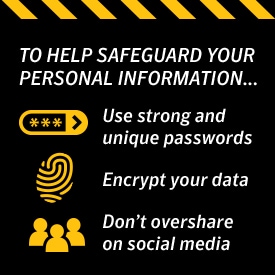
Using strong passwords is key to protecting your information online, so avoid using the same, easy-to-crack passwords, no matter how much you love your pet. Infuse each password with numbers and symbols to make it as difficult as possible to figure out.

Another way to safeguard your personal information online is to encrypt your data. Keeping your browser secure via encryption software guards online transactions, as it scrambles information sent over the Internet. Look for a “lock” icon on your browser status bar to make certain the information you send is protected. You should also use quality security software on all of your devices, and remember to update them regularly.

Protecting your information online also means not oversharing on social media. Make your Facebook page private, and do the same with Twitter and Instagram if you have the habit of posting about where you are and what you’re doing all the time. The less you share on social media, the less chance there is of someone taking advantage.

Wi-Fi is another method by which identity thieves and hackers can steal your information, so stick to protected Wi-Fi options instead of using a different one every day at a different coffee shop. Stay alert of phishing emails as well, and know what to look for. In other words, don’t ever open a file sent from someone you don’t know.

Know what data is the most sensitive, and do everything you can to protect it!

Norton logo
  • Norton
Norton empowers people and families around the world to feel safer in their digital lives

Editorial note: Our articles provide educational information for you. Our offerings may not cover or protect against every type of crime, fraud, or threat we write about. Our goal is to increase awareness about Cyber Safety. Please review complete Terms during enrollment or setup. Remember that no one can prevent all identity theft or cybercrime, and that LifeLock does not monitor all transactions at all businesses. The Norton and LifeLock brands are part of Gen Digital Inc. 


Want more?

Follow us for all the latest news, tips, and updates.