







7 reasons why your phone is so slow and 11 tips to speed it up
A sluggish phone is frustrating. If you’re tired of the constant lagging, freezing, and overall slow performance, we’ve got you covered. Learn what commonly causes a slow phone and how to resolve the issues. Then get a dedicated mobile security app to help keep your phone running smoothly.






1. Slow internet
If you’re dealing with slow apps and browsing on your phone, a poor internet connection might be the cause. In fact, this may be the most common reason behind Android and iPhone speed issues.
If your internet connection is holding you back, you might be able to speed up your phone by switching to a different Wi-Fi network or moving to a location with a stronger signal. You can also try these simple fixes to speed up your internet.
iPhone
1. Go to Settings and open the Wi-Fi menu. Make sure you’re connected to the correct network.
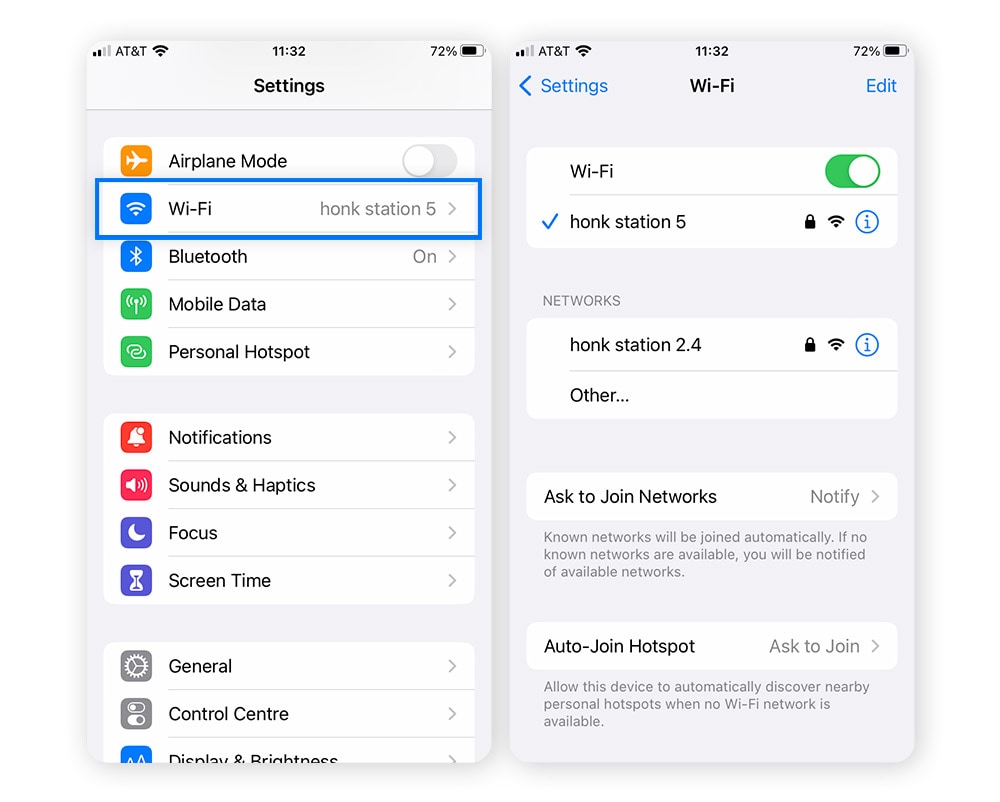
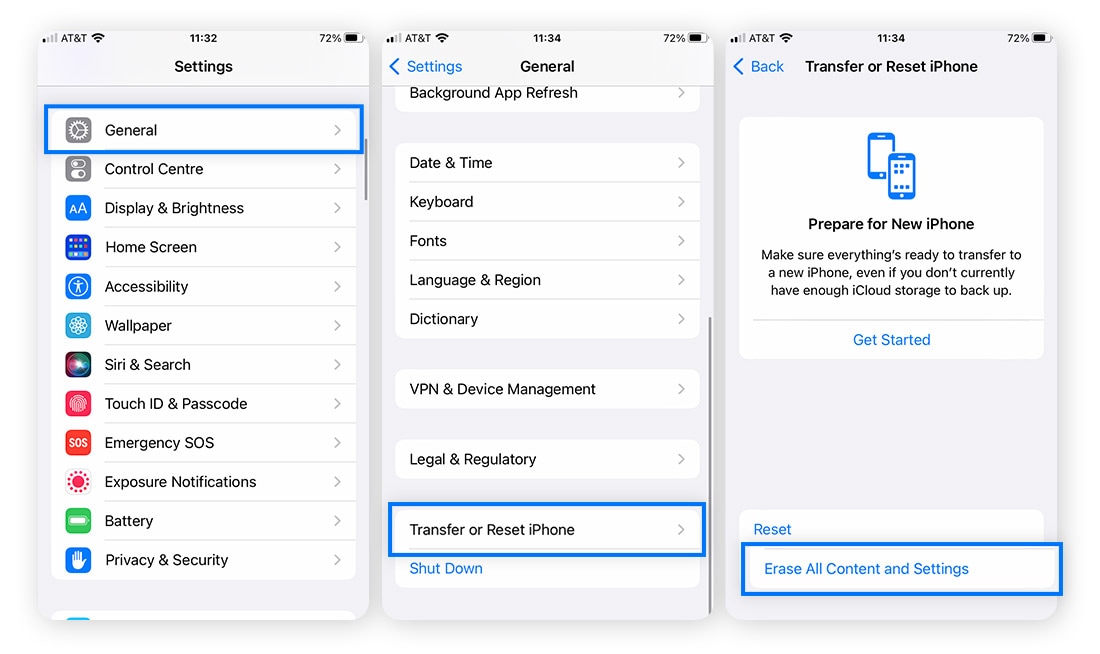
2. Reset your network settings by returning to Settings, then tapping General followed by Transfer or Reset iPhone. Select Reset and then Reset Network Settings.
Android
1. Go to Settings and select Network & Internet. Open the Wi-Fi menu and make sure you're connected to the right network.
2. Tap the network name and select Forget to try to reconnect to the network. Then reconnect to the network by tapping the network name again and entering the password.
If these iPhone and Android fixes don’t work, you may need to contact your internet service provider. Ask about upgrading your Wi-Fi to a faster speed or replacing your router.
2. Low storage space
Storing too much stuff on your phone is like packing a heavy suitcase—it’s going to slow you down. Too many photos, videos, and apps on your phone will consume its memory and affect its processing power.
Your phone will usually notify you when it’s low on space. That’s your cue to declutter your storage by getting rid of things you don’t need. If you don’t know how much storage you have left, go to Settings to check your storage on iPhone and Android.
Here’s how to delete unnecessary apps on your phone to clear memory and free up space, which can help speed up your device.
iPhone
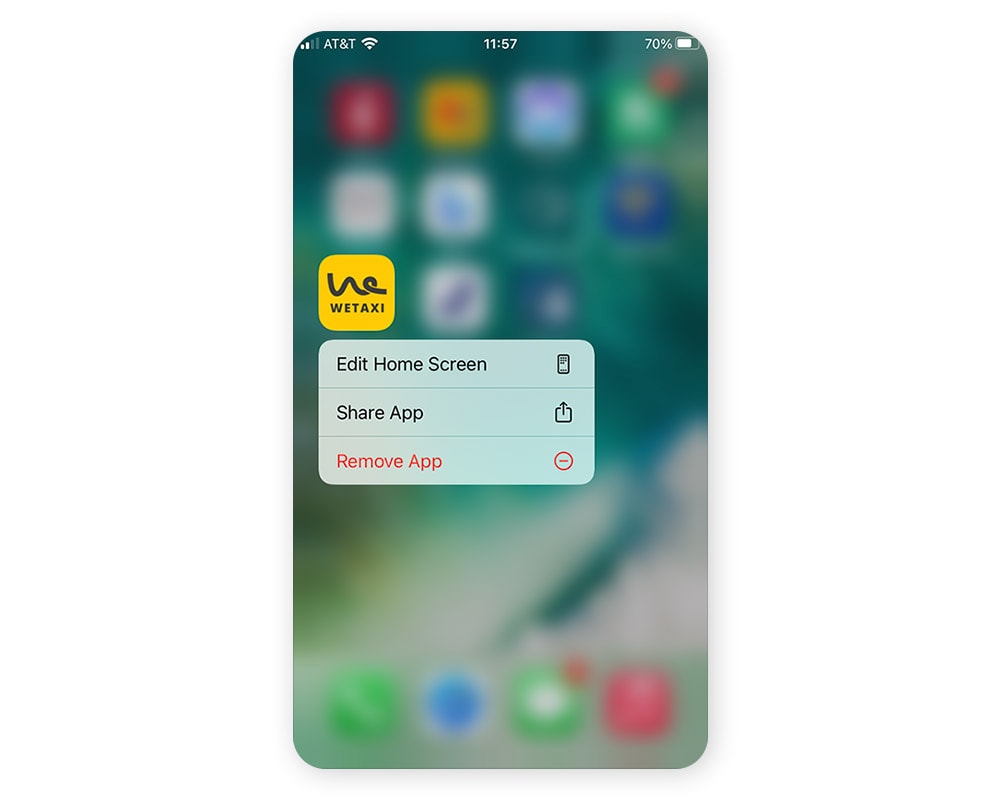
1. Press and hold the icon of any app on your home screen and tap Remove App when the menu pops up.
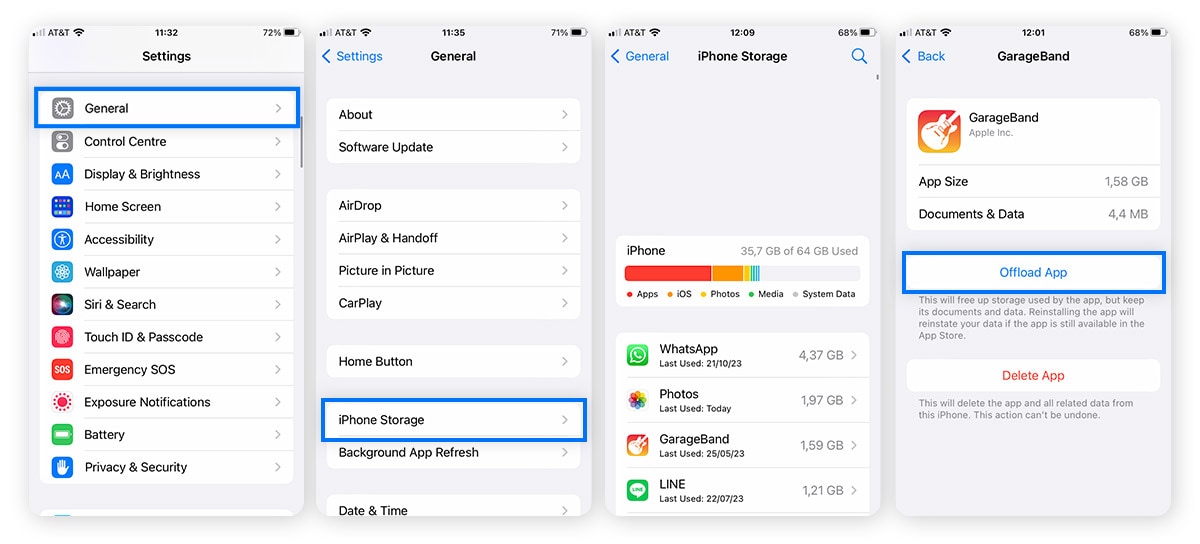
2. Or go to Settings > General > iPhone Storage to offload apps. Tap on the individual app you want to remove, followed by Offload App.
Android
1. Uninstall unwanted apps by going to Settings > Apps. Then select the app you want to remove and tap Uninstall.
2. To free up more space, clear the app cache by going to Settings > Apps. Then tap on an app > Storage > Clear Cache.
3. Too many background apps
If you’ve noticed your iPhone or Android phone running slow and freezing, you may have too many apps open at the same time. If you don’t close apps when you’re done using them, they will remain open in the background—taking up RAM and slowing processing speeds.
Here’s how to close apps on iPhone and Android:
iPhone
Swipe up from the bottom of your home screen to view all your open apps. Swipe up on individual app screens to close them.
Android
Tap the Square button on your home screen to view all your open apps. To close individual apps, swipe them left or right.
4. Outdated operating system
When your system and software aren’t up to date, your phone isn't optimised and will likely run more slowly than it should. Updating software also installs the latest security patches to help protect against hackers, malware, and unwanted apps like bloatware that can slow you down.
Here’s how to update your operating system on iPhone and Android:
iPhone
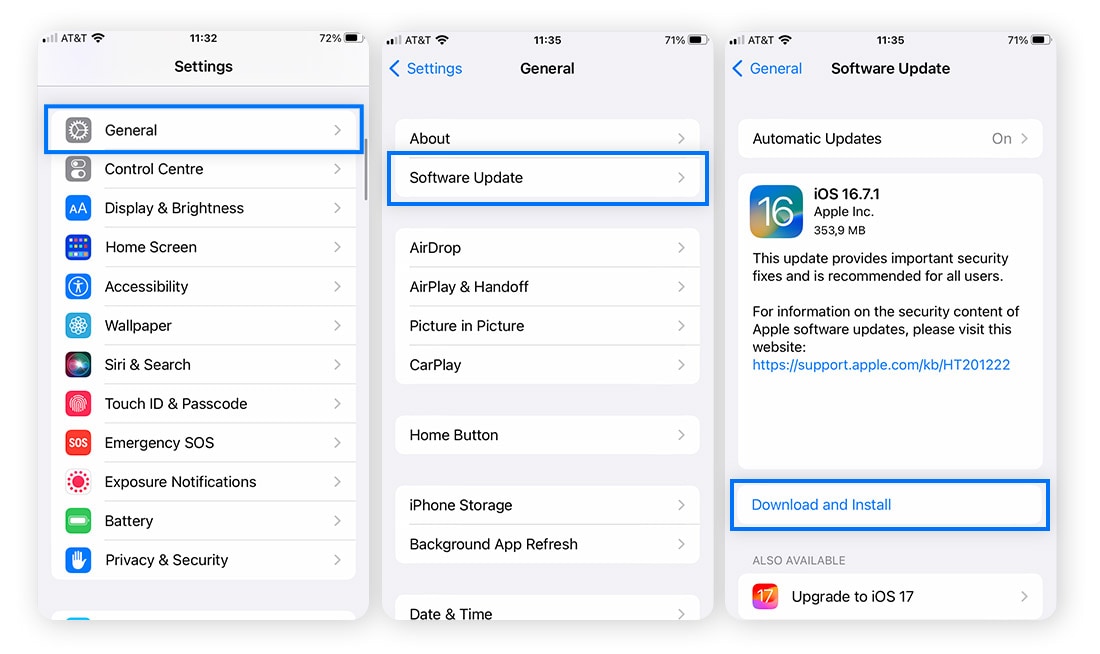
Go to Settings > General > Software Update to look for available updates. If an update is available, tap Download and Install to update your phone. If you haven’t enabled automatic updates, turn them on now.
Android
To check for system updates, go to the Settings menu and select System. Then, click System Updates to install any recent updates.
5. Faulty battery
One of the most common hardware issues that can cause phones to slow down is a faulty battery. As well as overheating and draining quickly, old and damaged batteries can’t provide as much power to your phone, resulting in lower processing speeds, especially when its charge is lower than 20%.
If your battery is draining more quickly than usual, or if your phone shuts down before the battery level reaches 0%, then you may have a faulty battery. Here’s how to investigate battery problems.
iPhone
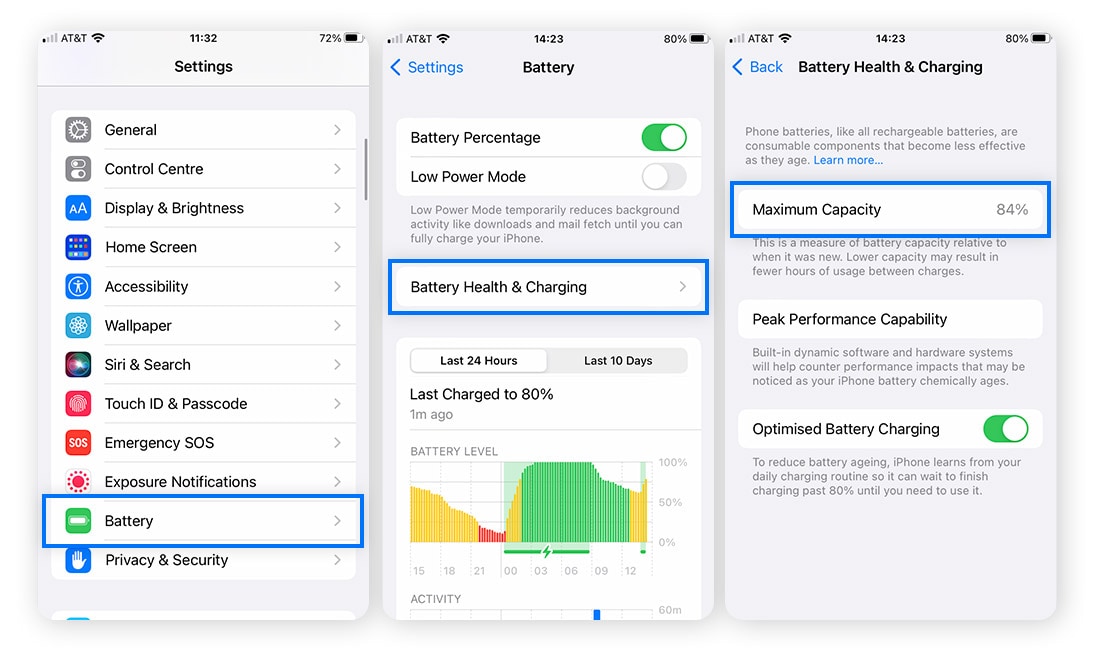
Go to Settings > Battery > Battery Health & Charging. If your battery has fallen below 80% of its original maximum capacity, take your phone to an Apple Store or service centre to ask about a replacement.
Android
Most Android phones don’t have a battery health feature. But you can download a third-party app, such as Accubattery, to check your battery’s health. If you notice that your Android phone’s battery pack is bulging or that it gets very hot during charging, turn your phone off immediately and take it to a service centre.
6. Failing RAM
RAM is your phone’s short-term memory that allows it to access necessary information quickly. This helps your phone run faster, but only if you have enough RAM to handle what you throw at it. If you have low RAM or faulty RAM, it can cause processing bottlenecks resulting in your phone lagging or even crashing.
Follow these steps to fix RAM problems on your iPhone or Android phone:
1. Restart your phone periodically. This will refresh your RAM and it may speed up your phone.
2. Update your operating system and apps to help your RAM work more efficiently.
3. Close any unused apps running in the background to help free up RAM.
7. Malware or viruses
Viruses and other malware can significantly impact device performance. Malicious programmes often run in the background, consuming valuable processing power and hogging resources. And they can corrupt essential files or basic settings, which will cause your phone to behave erratically or even crash.
In addition, some malware can continuously send and receive data, generating excessive network traffic that can reduce responsiveness and slow performance. And if a virus accesses your CPU, the extra work can overheat your phone and slow it down.
How to speed up your phone: 11 tips
If you have a slow phone, you likely don’t need to take it to a service centre. There are several ways you can speed up your phone right away.
If you’re wondering how to speed up an iPhone or Android phone, try the following cyber hygiene fixes:
1. Close all apps: Give your phone a fresh start by closing all open apps. This will help save your CPU, RAM, and battery life—all of which are critical for achieving optimal speeds.
2. Restart your phone: Restarting your phone refreshes its RAM and allows new updates to be installed. This can boost the performance of apps and the overall speed of your phone.
3. Check your internet connection: Make sure you’re connected to the right Wi-Fi network and improve download speeds by checking that you’re not using data in a room with poor connectivity.
4. Check your storage: Offload files and apps you don’t need to free up space. Social media apps, video files, and streaming apps can take up a lot of space and may cause your phone to slow.
5. Check your battery health: Check your battery health and consider replacing it if its maximum capacity has fallen below 80%.
6. Scan your phone for malware: A slow phone may be a sign of malware. Help protect your phone and boost performance by using a powerful online security app like Norton 360 Deluxe.
7. Update your OS and apps: Keeping your software and operating system updated can improve performance and patch up issues that might be affecting your speed.
8. Turn off location services: Sending and receiving location data requires more processing power and may slow down your phone. Consider turning this feature off to improve speed.
9. Delete unused apps: Apps take up space whether you’re using them or not. Offload or delete unneeded apps to jettison dead weight that may be slowing you down.
10. Clear your cache: Caches help your phone run faster—until they get too full. Then, it has the opposite effect. Be sure to clear cookies and cache regularly.
11. Restore your phone: As a last resort, you can try restoring your device to its factory settings. This will delete everything from your phone (apps, photos, files, etc.) that wasn’t there when it left the factory floor—including anything that may be causing your phone to slow down.
Keep your device running smoothly
It’s normal for phones to slow down over time. Thankfully, you can help revive a sluggish phone by following the tips above and practicing good digital hygiene, like using robust mobile security software.
Norton 360 Deluxe is a comprehensive online security app that provides advanced, round-the-clock protection to help protect your phone against malware, suspicious apps, and other online threats that can infect your phone, slow it down, and sap performance.
FAQs about why your phone is so slow
Still wondering why your phone is lagging? Want to know how to speed up your iPhone or Android phone? We've got you covered.
Can phones get viruses?
Phone viruses may be rare, but phones are still susceptible to other types of Android and iPhone malware that can infect systems through app downloads, phishing attacks, and smishing texts.
Does Apple still slow down iPhones?
No, Apple doesn’t purposefully slow down iPhones. Apple was involved in a scandal that emerged in late 2016 known as “Batterygate” in which the company was accused of slowing down iPhones as part of a planned obsolescence scheme. Apple still denies this accusation and characterises the slowdowns as being due to “software performance controls” because of battery degradation.
How can I improve my phone’s performance?
To help improve your phone’s performance and speed, close unused apps, delete apps you no longer use, clear your cache, and update your operating system to ensure you have the latest software.
Why is my phone so slow all of a sudden?
If your phone suddenly slows down, some of the likely causes include a poor internet connection, too many apps running at once, a faulty battery, not enough storage space, or even a malware infection.
Editorial note: Our articles provide educational information for you. Our offerings may not cover or protect against every type of crime, fraud, or threat we write about. Our goal is to increase awareness about Cyber Safety. Please review complete Terms during enrollment or setup. Remember that no one can prevent all identity theft or cybercrime, and that LifeLock does not monitor all transactions at all businesses. The Norton and LifeLock brands are part of Gen Digital Inc.








Want more?
Follow us for all the latest news, tips, and updates.