






How to stop spam texts: 7 easy strategies
Are you sick of random text messages? Spam texts aren’t just irritating — they can expose you to malware, identity theft, and other threats. Read our guide to learn how to stop spam text messages. Then, install Norton 360 Deluxe for powerful, AI-powered scam protection that helps detect dangerous spam texts.




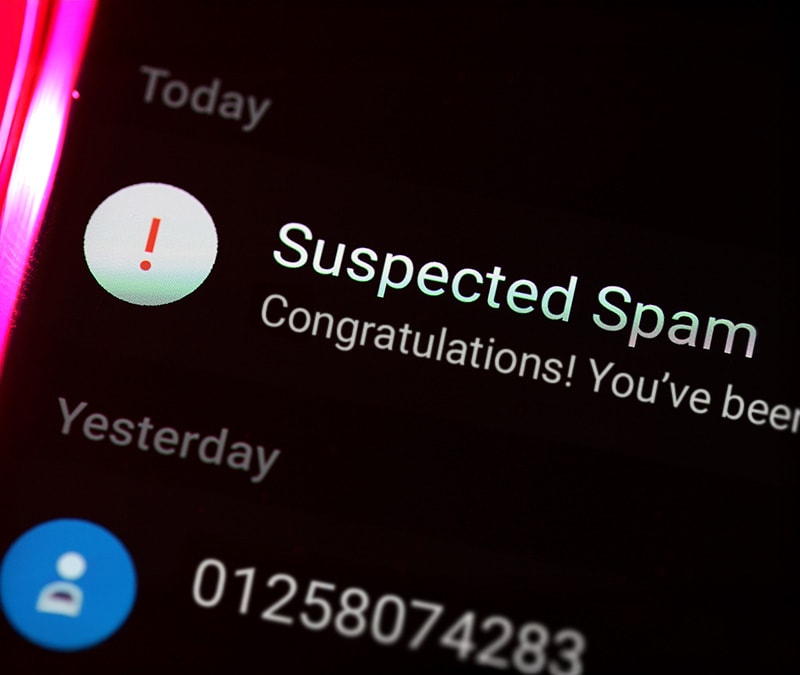

While the UK government has adopted measures to limit unwanted spam or commercial text messages, it hasn’t stopped scammers from sending unsolicited texts. stopped scammers from sending these unwanted texts.
Spam messages are often from annoying advertisers, but some can be scammers trying to trick you into sharing personal information.
Here’s how to stop spam texts and handle them safely.
1. Don’t respond
Replying to spam can lead to more of it. Even if you suspect a text in innocent (albeit annoying) spam, they may not always be what they seem. If you’re actually dealing with a scammer, responding with "STOP" or "UNSUBSCRIBE" can confirm to them that your number is active.
In either case, simply ignoring spam will not eliminate all unwanted messages, but it can reduce the volume of real spam over time.
If you suddenly receive a high volume of spam messages, it’s possible that your number was part of a data breach. In this case, a scammer (or multiple) might be targeting you. If something feels off, either in the contents or the frequency of the spam messages, do not respond.
2. Block spam texters
When you block a phone number, you won’t receive a spam text, smishing attack, or robocall from that number again. Many text spammers use multiple numbers, so you may have to block new spam texts from different phone numbers as you receive them.
Follow the steps below to learn how to block spam texts on iPhones and Android devices.
How to block spam texts on iPhone
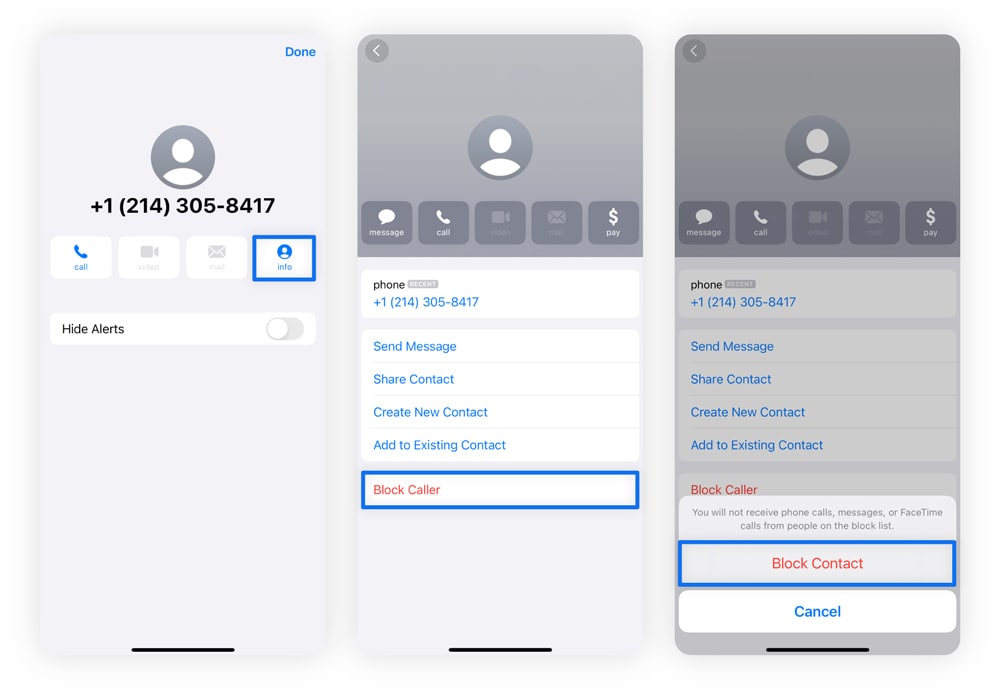
To help boost your iPhone’s security, you can block text messages on an iPhone by following these steps:
- Tap the phone number at the top of the spam message.
- Tap the Info button.
- Select Block this Caller.
- Tap Block Contact.
How to block spam texts on Android
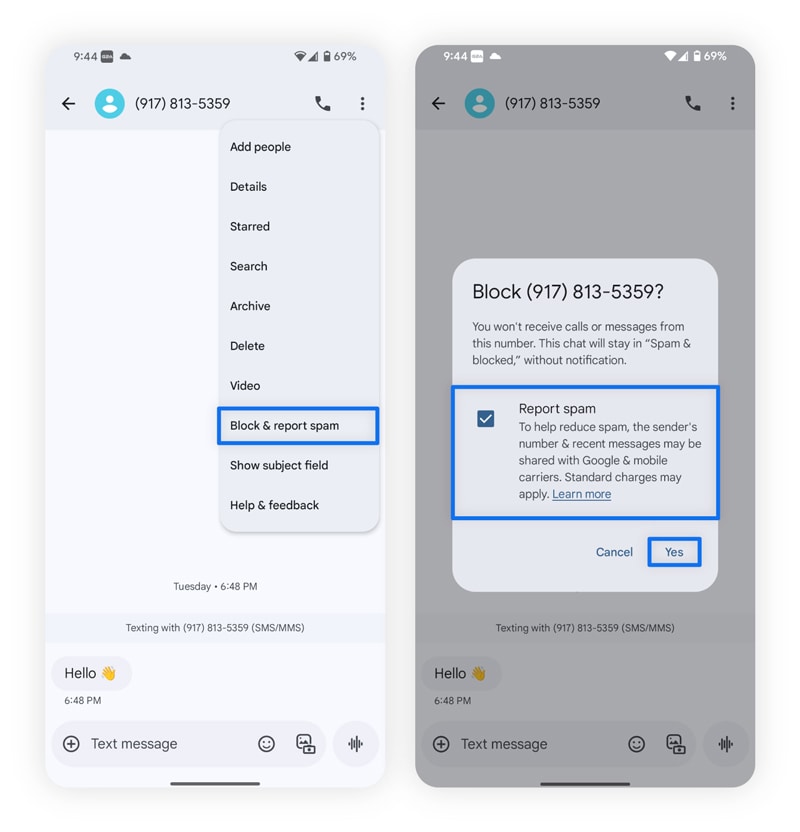
To help boost your Android security, you can block text messages on an Android by following these steps:
- Tap the three-dot icon at the top-right corner of the spam message.
- Tap Block & report spam.
3. Report spam texts
After you block the number sending spam text messages, you should report it as spam to your carrier. You can do this by forwarding the message to 7726 (SPAM). After you’ve forwarded the message, your cell phone carrier can investigate the text and number.
Forwarding a text to 7726 works for most cellular providers, including AT&T, T-Mobile, and Verizon. Reporting spam texts is a great way to help keep you and others safer from text scammers.
How to report spam texts on iPhone
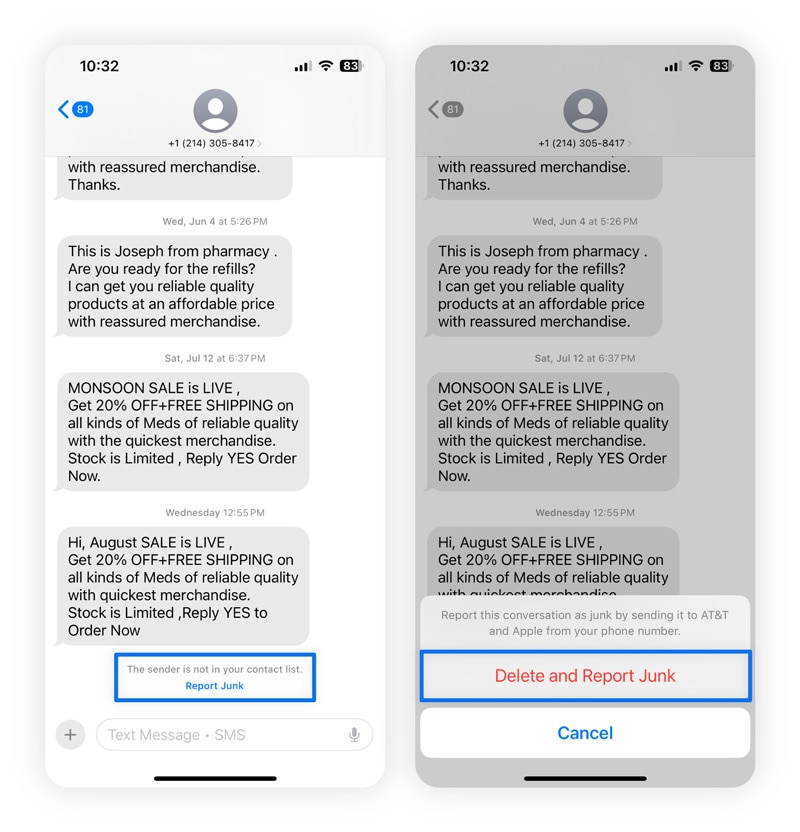
On an iPhone, open the message from an unknown sender, tap Report Junk at the bottom, then select Delete and Report Junk. This sends the message to Apple and removes it from your device.
For extra protection, you can also forward the spam message to 7726 to report it to your carrier.
How to report spam texts on Android
To report spam texts on Android, open the Messages app and tap the conversation. Select the three-dot menu and choose Block or Report spam (options vary by device). You can also forward suspicious texts to 7726 (SPAM) in supported regions.
4. Enable spam filters
You can also help stop unwanted texts by using spam filters. Both iPhones and Android phones have spam filters designed to weed out unwanted spam and commercial messages.
How to filter spam on iPhone
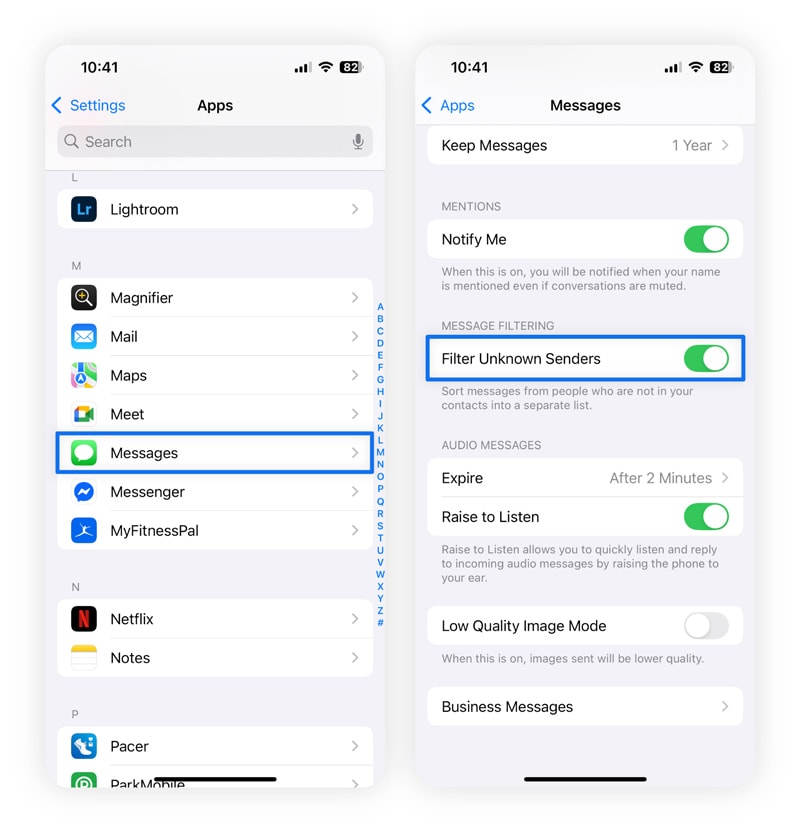
To filter spam texts on an iPhone, start in your Settings app. Here’s a more detailed breakdown:
- Go to Settings and select Apps.
- Select Messages, then scroll to and select Filter Unknown Sender.
How to filter spam texts on Android
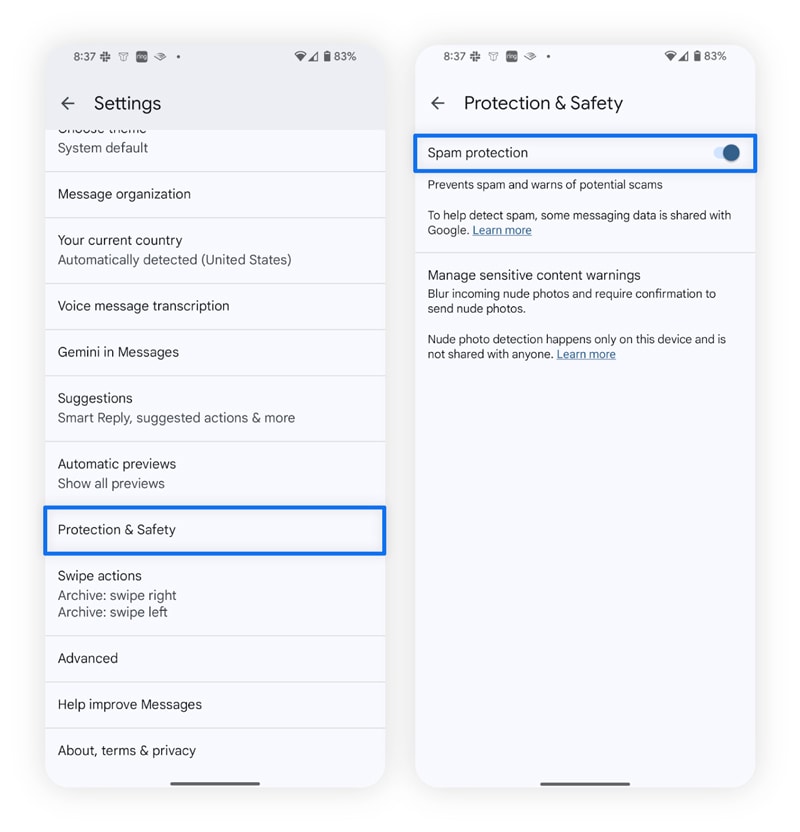
To filter spam messages on Android, navigate to Messages first. Here’s a more detailed breakdown:
- Go to Messages and tap your profile icon.
- Select Settings, then tap Protection & Safety.
- Select Spam protection.
Since there are so many types of Androids, the steps may vary depending on your device. On some Android devices, the process for filtering out spam numbers will look more like this:
- Open Google Messages (the default messaging app on most Androids), then tap your profile picture or initials in the top right corner of the screen.
- Tap Messages settings.
- Tap Spam protection.
- Turn on Enable spam protection.
5. Use third-party spam protection apps
Your carrier’s built-in features offer a first line of defence, but adding a third-party spam-blocking app can create an extra barrier between scammers and your inbox. These apps often provide more advanced filters, real-time detection, and customisable controls that go beyond basic carrier tools, helping reduce clutter and protect your personal information.
Some third-party options include:
- Norton 360: AI-powered scam detection features help you spot text scams masquerading as regular marketing spam, reducing your risk of interacting with malicious content.
- YouMail: Provides spam and voicemail protection with features like auto-blocking known scammers and spoof protection.
- Truecaller: Offers global spam detection with a huge database of spam numbers and SMS filtering.
Not all spam messages are scams — but it can be hard to tell. With Norton 360 Deluxe, you’re getting an extra pair of eyes to see the difference. With in-built, AI-powered scam detection, just take a screenshot of a suspected scam text, then paste the screenshot into the tool. Within seconds, Norton analyses the content, flags potential scams, and helps you decide whether or not the text is legit.
6. Manage your online footprint
Spammers collect phone numbers from data brokers, social media, and public records. When your number appears on a website, forum, or profile, others can copy and sell it to third parties without you knowing. From there, it can spread across multiple databases for both marketers and scammers. You can reduce this risk by cleaning up your digital footprint.
Start by running a quick search of your name and phone number to see where they appear. You can request removal from data broker sites or use a service to do it for you. Tighten your social media privacy settings and avoid posting personal details, like your phone number, on public profiles or in online groups to make it harder for spammers and scammers to find you.
7. List your number on the Telephone Preference Service (TPS)
While it won’t stop spam text messages, registering your phone number with the Telephone Preference Service can help reduce unwanted marketing calls. The TPS maintains a register of numbers whose owners have opted out of receiving unsolicited sales and marketing calls.
If you receive a marketing call more than 28 days after your number has been added to the register, you can report it to the TPS for investigation.
What to do if you get spam texts
If you get a spam text, avoid responding and don’t click any links. It’s also best practice to ensure your phone is always updated, your data is backed up, and scam protection is installed. This way, should you receive a scam message that looks like innocent spam, your phone will be ready to defend you.
These steps help prevent scams and unwanted messages.
- Do not respond: Replying confirms your number is active and may lead to more spam or scam texts.
- Don’t click any links: Links in spam texts may actually be part of a scam and can install malware or lead to phishing sites.
- Keep software updated: Updates fix security vulnerabilities that scammers can exploit.
- Regularly back up your phone: Protects your data in case malware compromises your device.
- Invest in scam protection: Use apps or services like Norton 360 Deluxe that can help detect scams hiding amongst the spam messages you receive. If a spam message looks fishy, take a screenshot and pop it in Norton — if the text is a scam, we’ll tell you in seconds.
Protect yourself from scammers and hackers
If a spam text feels suspicious, don’t reply or click any links. For added protection, get Norton 360 Deluxe. Norton uses AI-powered scam protection to detect threats and guard against malware, phishing, and unsafe websites, protecting you against potential scam messages that sneak through spam filters.
FAQs
Why am I getting spam texts?
You may be getting spam texts because your phone number ended up on a marketing list, or because automated tools randomly generated it. Most spam texts are just unwanted promotions, but some could be scammers trying to steal your personal information. Either way, ignore the message and block the number.
What is 7726, and how does it work?
The code 7726 offers a quick way to forward spam text messages to your cell phone carrier's spam department so they can then take action against spammers. The code is easy to remember because it spells "SPAM."
When you forward a text to 7726, it alerts your cell phone carrier of a spam problem. After a carrier receives a spam report, it may ask you for more information and then launch an investigation into the spam sender.
What happens after I report a spam text to 7726?
Reporting spam to 7726 lets your carrier investigate and take action against the sender. They may block the number, filter the message type, share information with other carriers, or shut down the fraudulent line. To protect yourself and others, report all suspicious messages to 7726.
Is it okay to read spam texts?
You can safely read a spam text if you don’t click any links in the message or respond to the sender. The SMS format doesn’t automatically start downloading links or files.
What happens if you reply to a spam text?
Replying to a spam text confirms that your number is active, which can lead to even more unwanted messages. If the message is part of a scam rather than simple spam, responding may also expose you to further phishing attempts or social engineering tactics.
Even though you can’t get hacked by simply replying to a scam text, it’s best to stay safe by not responding, blocking the number and reporting the message to 7726.
Editorial note: Our articles provide educational information for you. Our offerings may not cover or protect against every type of crime, fraud, or threat we write about. Our goal is to increase awareness about Cyber Safety. Please review complete Terms during enrollment or setup. Remember that no one can prevent all identity theft or cybercrime, and that LifeLock does not monitor all transactions at all businesses. The Norton and LifeLock brands are part of Gen Digital Inc.







Want more?
Follow us for all the latest news, tips, and updates.