






Do I need a VPN? 6 reasons you should get one
Whether browsing at home, hopping on the Wi-Fi in your local café, or travelling abroad, a VPN can help mask your location and online activity from hackers, snoops, and advertisers. But that’s not all — read on to learn what else a VPN can do for you. Then get Norton VPN to help secure your internet connection and boost your privacy online.

2025
Consumer
Security Innovator





Do I need a VPN and why?
Whether or not a VPN is necessary depends on your circumstances — but sometimes they’re essential, and everyone can benefit from using one. For example, a VPN can help:
- Hide your IP address and online activity from third parties.
- Protect you from hackers lurking on public networks.
- Access your favourite content from different locations.
- Prevent ISP throttling from slowing down your internet.
- Encrypt all the internet data you send and receive.
- Reduce the number of targeted ads you see online.
- Protect sensitive company data when you work remotely.
To understand the benefits of a VPN in more detail, let's look at some common situations where these internet privacy and security tools come in handy, and how VPNs work to boost your privacy, security, and accessibility. Here are some reasons why you might want to use a VPN:
1. You use public Wi-Fi
Making use of public Wi-Fi can help you get online while on the go, but be sure to use a VPN when connecting for a powerful layer of extra protection. Otherwise, attackers may be able to exploit weak network security to steal your personal information, monitor your online activity, or inject malware into your internet traffic.
Hackers are known to favour unsecured public networks to launch man-in-the-middle and packet sniffing attacks which can passively capture and read unencrypted data like login credentials or private messages, or even actively intercept and manipulate your communications. A VPN uses encryption to secure your connection, making it practically impossible for attackers to read or tamper with your internet data.
2. You want to secure your home Wi-Fi
Your home Wi-Fi might seem secure, but even the latest wireless security protocols have weaknesses. And if a hacker guesses or cracks your Wi-Fi password in a brute-force attack, they could gain access to your entire network, allowing them to monitor your internet activity, access connected devices, and steal sensitive information leading to identity theft.
A VPN strengthens your home Wi-Fi security by routing all your internet traffic through an encrypted VPN tunnel between your devices and the internet. This ensures that your online activities — such as browsing, shopping, or private messaging — remain private and secure from hackers, advertisers, and other people on your home network.
3. You want to access content while travelling
Streaming platforms like Netflix and Hulu offer location-based content libraries, meaning some of your favourite shows and movies may be unavailable when you travel. However, you can use a VPN on holiday to connect to a server in your home country and access your favourite content.
Using a VPN to change your IP address can also be useful for accessing other location-dependent services while you’re abroad. For example, you might need to access your online banking or use a local news website that's not available in your current location.
Just be sure to check content and service providers’ policies before using a VPN to access content in a different location, as this may violate their terms and conditions.
4. Your ISP is slowing down your internet connection
Struggling with frustratingly slow internet? To help manage network load, ISPs often slow down certain types of traffic, like streaming or gaming, based on usage patterns. This practice, known as bandwidth throttling, can lead to buffering, lag, poor ping speeds, and reduced performance.
A VPN helps prevent ISP throttling by encrypting your internet traffic and masking your online activity. Since your ISP can no longer see what sites or services you’re using, it becomes much harder to target your connection based on your activity, helping to ensure a smoother and more reliable online experience.
5. You want to see fewer targeted ads
Targeted advertising relies heavily on tracking your online activity. Advertisers build a detailed profile of your interests, demographics, and browsing habits using cookies and other tracking data. This data allows them to serve you personalised ads, which, while sometimes helpful, can feel invasive.
A VPN can help disrupt advertiser tracking by masking your IP address, a key identifier used to link your online activity. With a VPN, websites and advertisers see the IP address of the VPN server, not your actual location. This makes it harder for them to build an accurate profile and bombard you with targeted ads.
As well as hiding your IP address, Norton VPN comes with an advanced Ad Tracker Blocking feature which adds an extra layer of protection against third-party trackers following your online activity.
6. You work remotely
Handling sensitive company data on unsecured networks while working remotely poses legal, financial, and reputational risks. This is especially true when accessing proprietary information, financial reports, or internal communications, or engaging in activities like peer-to-peer file sharing.
The risks are even greater in regulated fields like healthcare, finance, or law, which is why many organisations require the use of an SSL VPN to remotely access their networks. To stay protected, use a VPN before accessing confidential data, especially on public networks, and ensure you’re using a robust VPN protocol like OpenVPN or IPsec to ensure compliance.
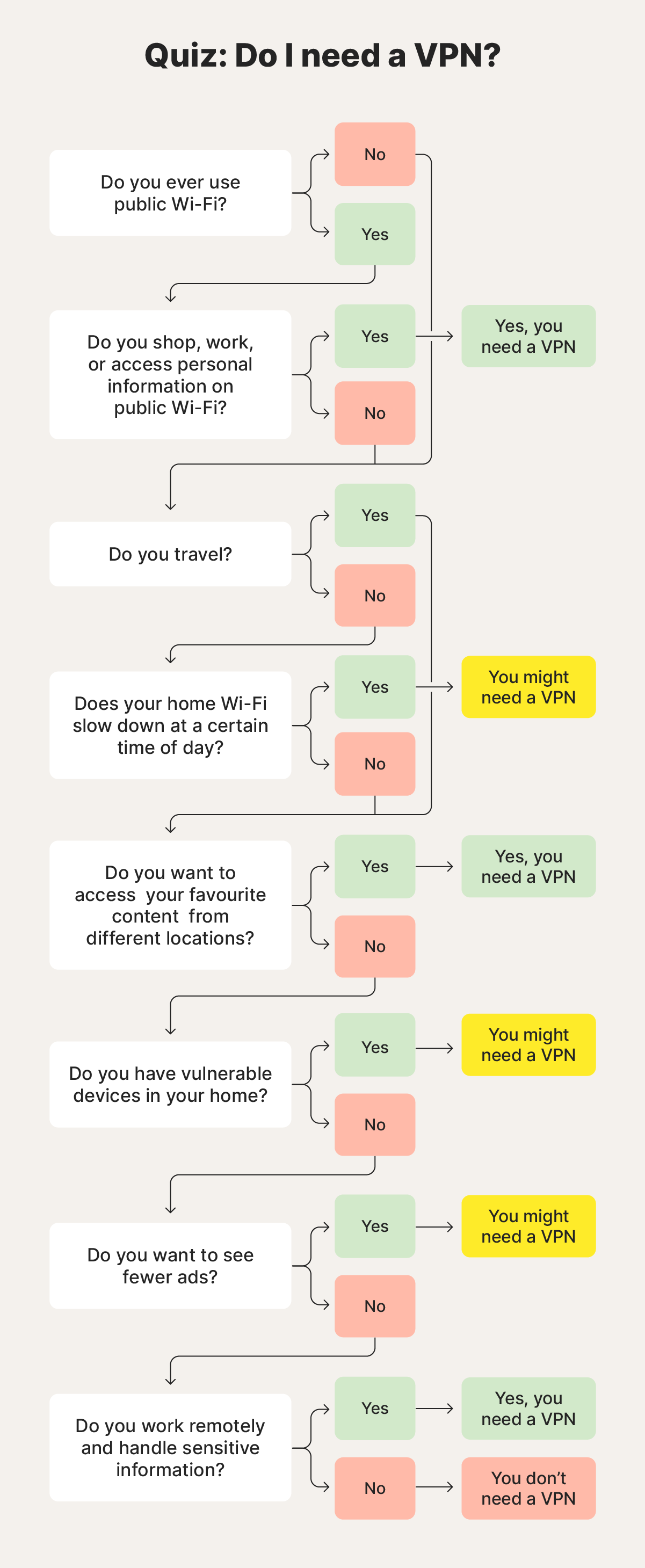
Should I use a VPN?
Although everybody can benefit from the added privacy protection of a VPN, the need is much greater for people who want to use public Wi-Fi, avoid ad tracking, access region-locked content, work remotely, communicate privately, or torrent securely.
Here are some examples of people who should use a VPN:
- Privacy-conscious users: By using a VPN to mask your IP address and encrypt your internet data, you can help anonymise your online activity making it harder for third parties to track you.
- Holidaymakers: Connecting to a VPN server in another country can give you access to different streaming options, websites, and other online content.
- Remote workers: VPNs provide remote workers with secure access to company networks and resources, ensuring sensitive information is safe even on external networks.
- Journalists and activists: Whistleblowers, journalists, and activists make extensive use of VPNs to help keep shield identities and prevent communications from being monitored or shut down.
- Collaborators: VPNs can encrypt and mask P2P file-sharing activity from ISPs, helping to prevent bandwidth throttling or potential warnings related to high data usage or specific traffic types.
How to choose a VPN
When choosing a VPN, start by looking for a reputable VPN provider that offers a good mix of essential VPN features that meet your needs, reliable performance, and a clear commitment to user privacy.
Here's a breakdown of key factors to consider:
- Strong encryption: Look for a VPN with AES-256 encryption, the industry standard for data protection.
- No-log policy: Ensure your VPN provider has a strict no-log policy, meaning they don't track or store your online activity.
- Server locations: Pick a VPN with a wide range of server locations to access the content you want and optimise connection speeds.
- Speed and performance: Choose a VPN with fast connection speeds and minimal impact on your internet performance.
- Security protocols: Look for a VPN that offers secure protocols like OpenVPN and IKEv2 to ensure the highest level of security and privacy for your data.
- Kill switch: Opt for a VPN with a kill switch that automatically disconnects from the internet if the VPN drops.
- Device compatibility: Ensure your chosen VPN is compatible with any device you plan to use.
- Simultaneous connections: Check how many devices you can connect simultaneously with a single subscription.
- Price: VPNs come in a range of prices. Find one that fits your budget while offering the features you need, and beware that free VPNs may not be as safe as you think.
- Customer support: Reliable, 24/7 customer support is essential for troubleshooting issues or getting help with setup.
- Independent audits: Look for VPN providers who undergo independent security audits to identify vulnerabilities and validate their security and privacy claims.
Choose a VPN that fits your needs
As you can see, there are plenty of reasons to use a VPN, especially a reliable option like Norton VPN which uses bank-grade AES-256 encryption and offers a range of cutting-edge security protocols.
Our VPN ranks #1 overall for network performance,1 boasts thousands of geo-optimised servers spread across 5 continents and helps put a stop to annoying ads. Plus, our plans cover up to 10 devices, so you can share all the benefits with your family. Get the VPN you need today.
FAQs
Are VPNs worth it?
A VPN is nearly always worth the many benefits it can provide, but it depends on your individual needs and priorities. If you value online privacy, security, and freedom and are willing to pay for a reliable service, then a VPN is a worthwhile investment.
Do I need a VPN at home?
While not always strictly necessary, using a VPN at home is advisable for the extra layer of security and privacy it provides — especially when doing internet banking or other sensitive online activities. Ultimately, the decision depends on your individual needs and priorities.
Do I need a VPN on my laptop?
It depends on your usage habits — if you use your laptop for remote working, accessing public Wi-Fi, or want to access content on the go, then you do need a VPN to boost your network security, enhance your privacy, and ensure accessibility.
Do I need a VPN on my iPhone?
Using a VPN on your iPhone offers crucial security, particularly on public Wi-Fi. It also helps bypass geo-restrictions and enables safe internet banking and online shopping — making it even more vital than on desktop computers, especially for those frequently using unsecured networks or travelling.
Do I need a VPN for international travel?
Yes, a VPN is highly recommended for international travel. It will protect your data on public Wi-Fi, allow you to access your favourite content and services from home, and avoid dynamic pricing that varies by region. Just beware that VPNs are banned in some countries.
Do I need a VPN for Firestick?
Yes, a VPN on your Firestick can enhance your privacy while streaming, help you access content from other countries, and, in some cases, even improve your streaming speeds by avoiding ISP throttling.
1 Based on a test of eight other leading VPN products selected by Gen in the VPN Products Performance Benchmarks report conducted by PassMark Software commissioned by Gen in November 2023.
Editorial note: Our articles provide educational information for you. Our offerings may not cover or protect against every type of crime, fraud, or threat we write about. Our goal is to increase awareness about Cyber Safety. Please review complete Terms during enrollment or setup. Remember that no one can prevent all identity theft or cybercrime, and that LifeLock does not monitor all transactions at all businesses. The Norton and LifeLock brands are part of Gen Digital Inc.






Want more?
Follow us for all the latest news, tips, and updates.